
Speeding Up Slow Test Suites with Test Selection
Regression testing of changes is usually done by re-running all automated or manual tests of a system (retest all). As more and more features are added to a software system over its lifetime, the number and overall runtime of tests also increases. As test suites grow, you have to run them less and less frequently if you want to run all tests. Therefore, the time between introducing a new bug with a change and getting the results of a failed regression test increases as well. However, re-executing all tests is not only expensive, it is also inefficient, since most of the tests in the test suite don't test a given change to the codebase.
Teamscale offers four test selection techniques that select and prioritize the tests you run, so that you find new bugs much faster than with retest all. In the Teamscale UI, you find them in the Test Suggestions perspective. They differ in two ways:
- Change-based or change-independent: A change-based technique selects the tests for a concrete set of code changes, for example, a pull request or a release. A change-independent technique builds a smoke test suite that you can run for any change.
- Data they need: Some techniques need testwise coverage, which records for each test which code it executes. The others only need your test code.
The following sections describe each technique and help you choose the right one for your situation:
Test Impact Analysis
How it works: Test Impact Analysis (TIA) is change-based. It uses the testwise coverage of previous test runs to determine which tests execute the code that a change modified. These are the impacted tests. Teamscale prioritizes them so that tests with a higher probability of failing run first. In your build, the test runner asks Teamscale for this list and executes only these tests, in this order.
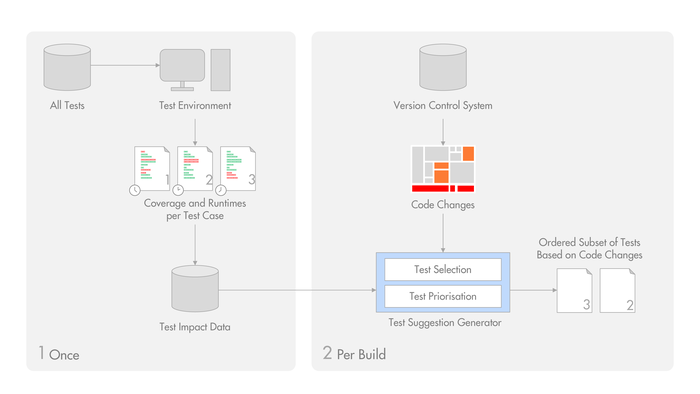
Effectiveness: On average, TIA catches 90% of new bugs in only 2% of your test runtime.
What it needs: Testwise coverage of your tests, which a coverage profiler records and uploads to Teamscale.
When to use it: Run only the impacted tests on every commit or pull request in your CI pipeline, and run all tests nightly or before a release.
Next steps: The Tests Covering Risks tab shows the impacted tests in the Teamscale UI. Learn how to provide testwise coverage to set up TIA.
Similarity Scoring
How it works: Similarity Scoring is change-based. It compares the text of each test implementation with the changed code and ranks the tests by how similar they are to the changes. Tests whose names and identifiers match the changed code come first, because terminological proximity is a strong predictor of relevance and bug-finding power. Teamscale removes stop words such as public or void before the comparison. When you select changes by issue, the issue title and description also count.
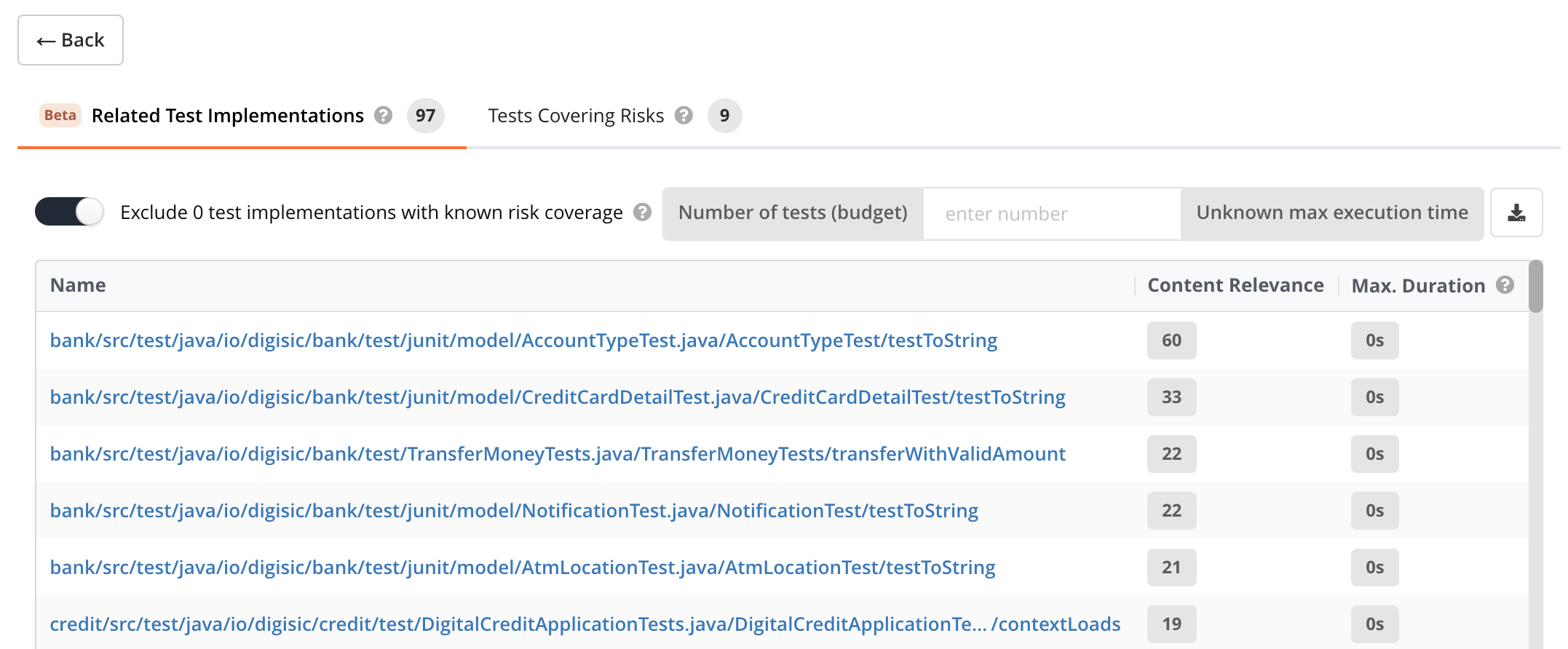
Effectiveness: On average, Similarity Scoring catches 90% of new bugs in only 4% of your test runtime.
What it needs: Your test code in your Teamscale project, with test implementations that Teamscale recognizes. It needs no test coverage.
When to use it: As a low-effort way to get started with change-based test selection.
Next steps: The Related Test Implementations tab shows the ranked tests in the Teamscale UI. Learn how to set up Similarity Scoring.
Pareto Optimization
How it works: Pareto Optimization is change-independent. It uses the same testwise coverage as TIA to build a smoke test suite. It maximizes code coverage for any given time budget.
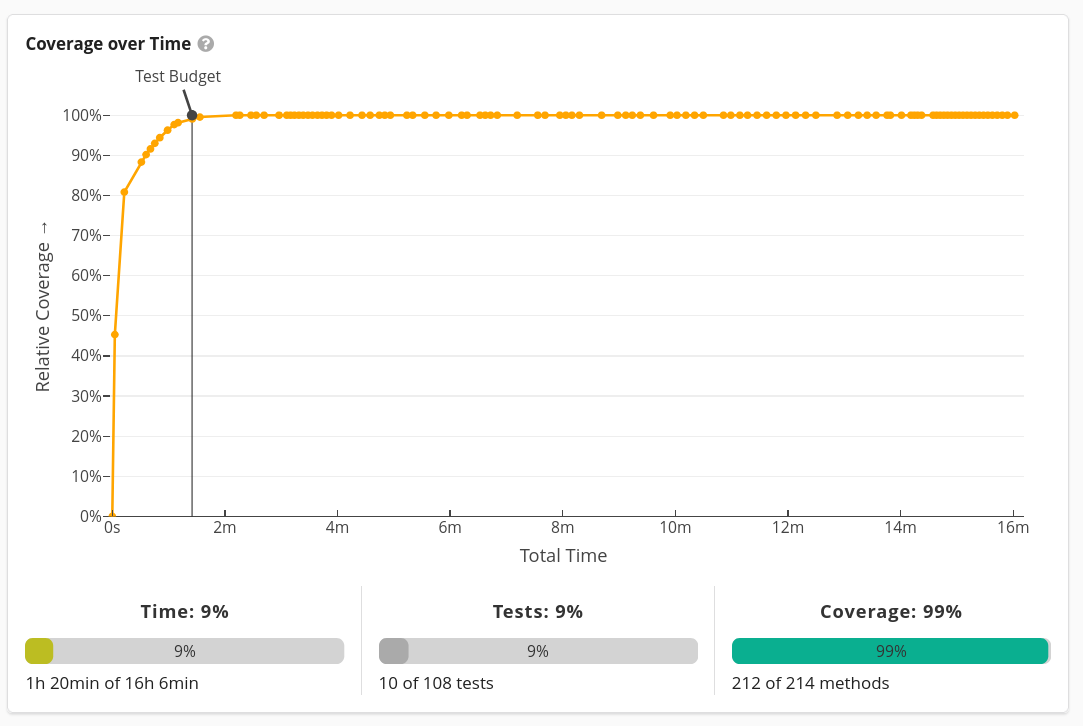 Pareto Optimization achieves almost the same test coverage (y-axis) as the full test suite in only a fraction of your usual test runtime (x-axis).
Effectiveness: On average, Pareto Optimization catches 90% of new bugs in only 11% of your test runtime.
What it needs: Testwise coverage of your tests, which a coverage profiler records and uploads to Teamscale.
When to use it: Run the smoke test suite as a quality gate before expensive test runs, for example, manual or HIL tests, or before you merge changes to the main branch. You can also run it frequently during the day to catch most bugs early. Then run the full test suite at night to catch the rest.
Next steps: The Coverage-Based Suggestions tab shows the smoke test suite in the Teamscale UI. Learn how to provide testwise coverage to set up Pareto Optimization.
AI Test Clustering
How it works: AI Test Clustering is change-independent. Teamscale sends the text of each test to an AI model, which turns it into an embedding. Tests with similar content get similar embeddings, so Teamscale can group redundant tests into clusters. It then ranks the tests so that the least redundant ones come first. This also leads to a smoke test suite that achieves high code coverage in very little time. Because the model handles both code and natural language, this works for automated and manual tests.
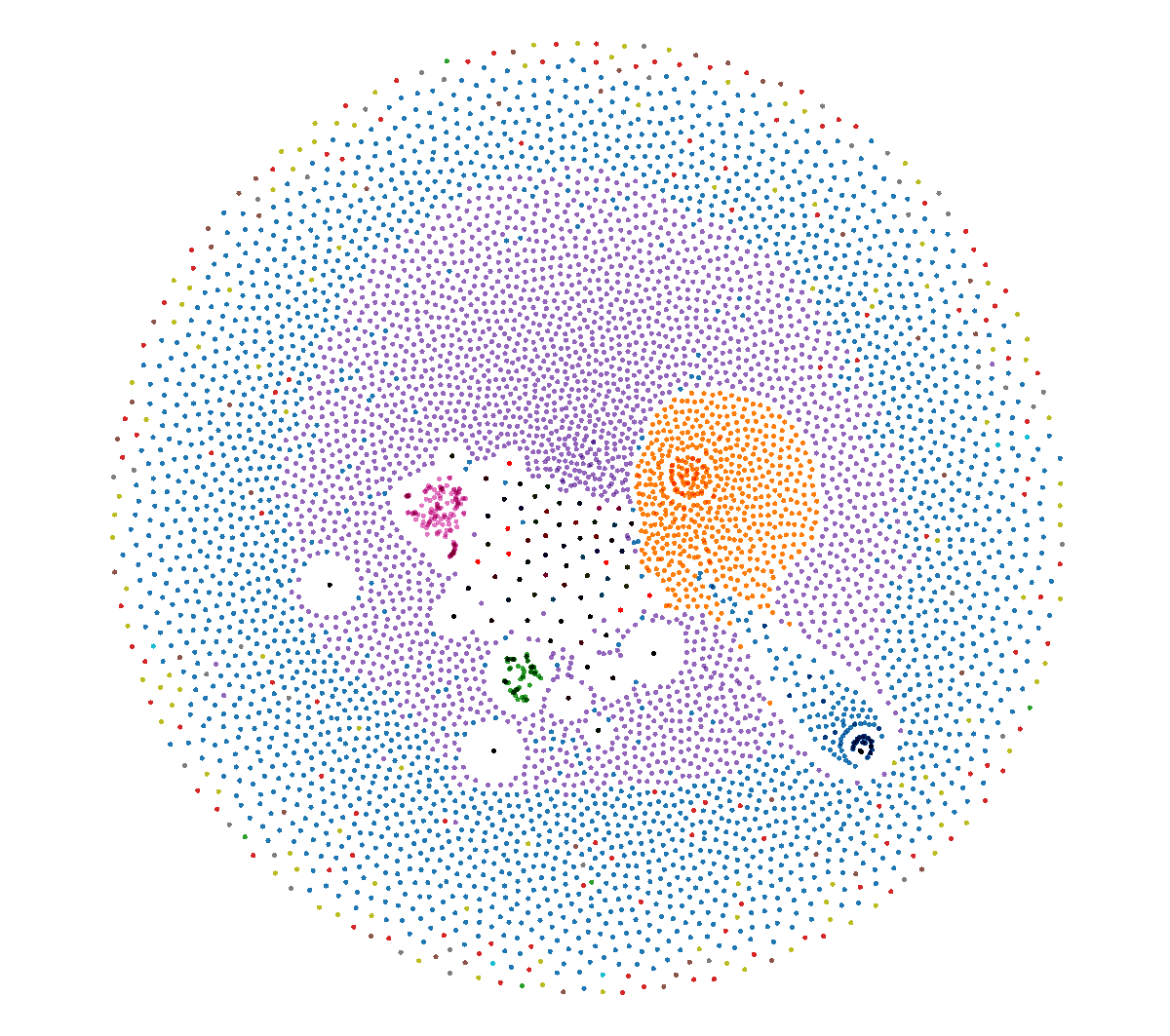 Embeddings of 6600 Robot Framework tests, projected into two dimensions. Each color is a cluster of tests that the model considers similar to each other.
Effectiveness: On average, AI Test Clustering catches 90% of new bugs in only 13% of your test runtime.
What it needs: Your test code in your Teamscale project, with test implementations that Teamscale recognizes, and an AI model provider with an embedding model. It needs no test coverage.
When to use it: As a low-effort way to build an optimized smoke test suite.
Next steps: The Content-Based Suggestions tab shows the ranked tests in the Teamscale UI. Learn how to set up AI Test Clustering.
Choosing a Technique
TIP
The techniques without testwise coverage are the easiest to set up, so start with Similarity Scoring for change-based selection and with AI Test Clustering for a smoke test suite. Move on to TIA and Pareto Optimization once you record testwise coverage, because coverage tells Teamscale which code each test actually executes.
| Technique | Type | Needs testwise coverage | Needs an AI model provider | On average catches 90% of new bugs in | Typical use |
|---|---|---|---|---|---|
| Test Impact Analysis | Change-based | Yes | No | 2% of test runtime | Run only the tests that execute a change in CI |
| Similarity Scoring | Change-based | No | No | 4% of test runtime | Find the tests related to a change or issue |
| Pareto Optimization | Change-independent | Yes | No | 11% of test runtime | Smoke test suite optimized for code coverage |
| AI Test Clustering | Change-independent | No | Yes | 13% of test runtime | Smoke test suite without any coverage data |
Learn how to set up test selection for each technique.