
Improving Test Quality and Efficiency with Teamscale
Most test teams we meet, face the following problems:
- Important changes remain untested and cause bugs.
- For many test stages, no one knows which code these tests actually cover, e.g. end-to-end tests, manual tests.
- AI agents produce code too fast, so you can't wait for slow test suites to complete.
- Tests are painfully slow. This slows down the entire development process and makes Shift Left impossible.
- The root cause of your production defects is unknown.
- There are no clear KPIs to guide sensible and cost-effective improvements.
Teamscale's Test Intelligence answers these problems by intelligently combining code, tests, issues and test coverage:
2min Summary of Test Intelligence
Prevent Production Defects
Most bugs occur in recently changed code. Every tester knows this and aims to do a comprehensive test of all recent code changes. However, in practice, testers often don't know everything that changed in their software system, because changes are not fully documented. This ranges from unannounced refactorings and undocumented bug fixes by developers to entire features that are developed without informing the testers.
So, not only do we ship a lot of code to production completely untested, it also causes the majority of production defects. [1]
Test Gap analysis prevents production defects by visualizing all recent code changes and whether they have already been covered by tests or not. It allows testers to schedule additional test cases for any risks they find in this untested code, before shipping your software to production.
MunichRe Prevents 50% of Their Production Defects with Teamscale
Watch the cost-benefit analysis for Test Gap analysis that we did together with our customer MunichRe.
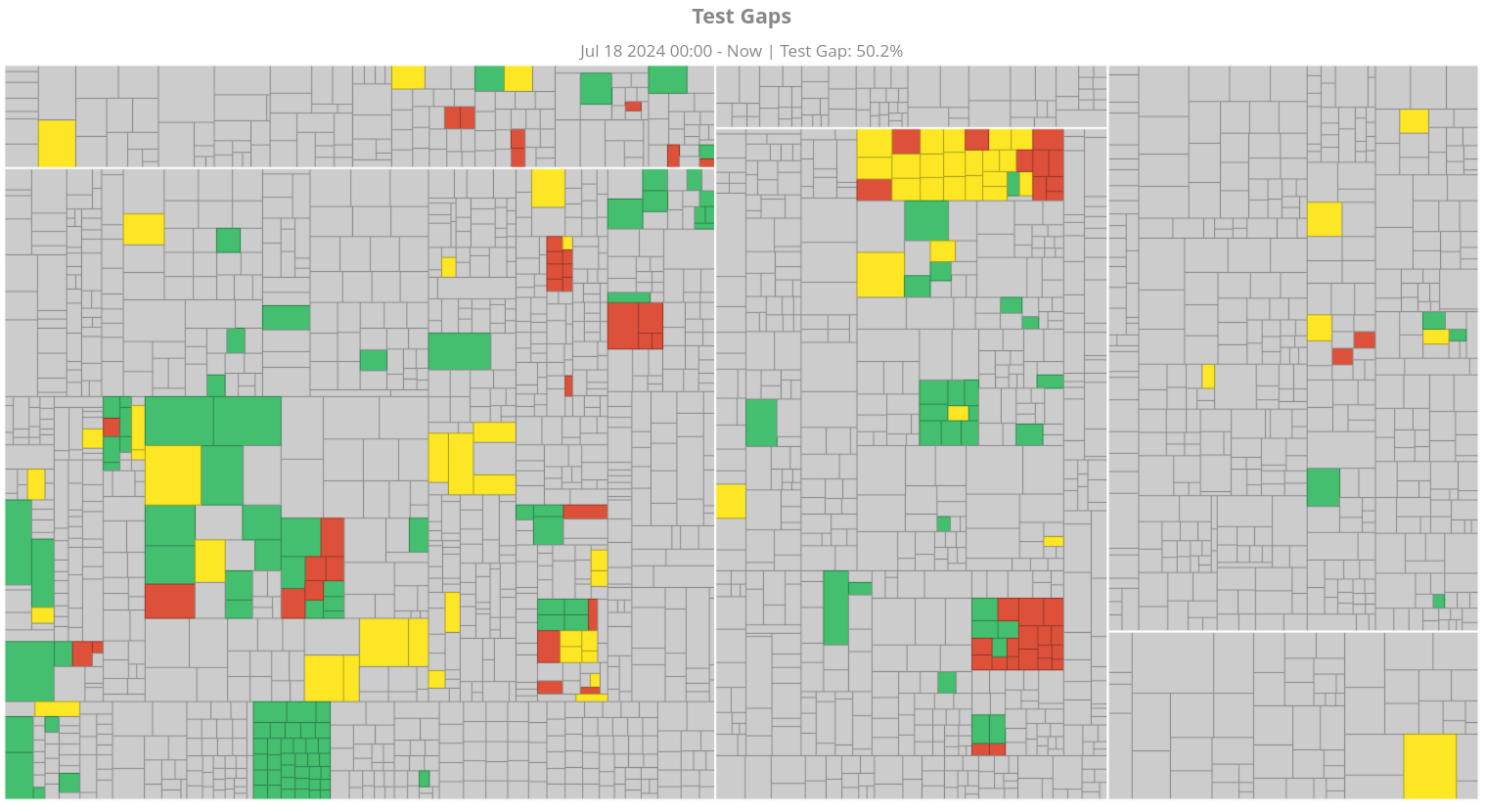 Colored rectangles are changed methods. Red and orange rectangles are Test Gaps: these methods have been changed but never tested.
Successful teams run Test Gap analysis for all of their test stages, including unit tests, integration tests, end-to-end tests, manual tests, software- or hardware-in-the-loop tests.
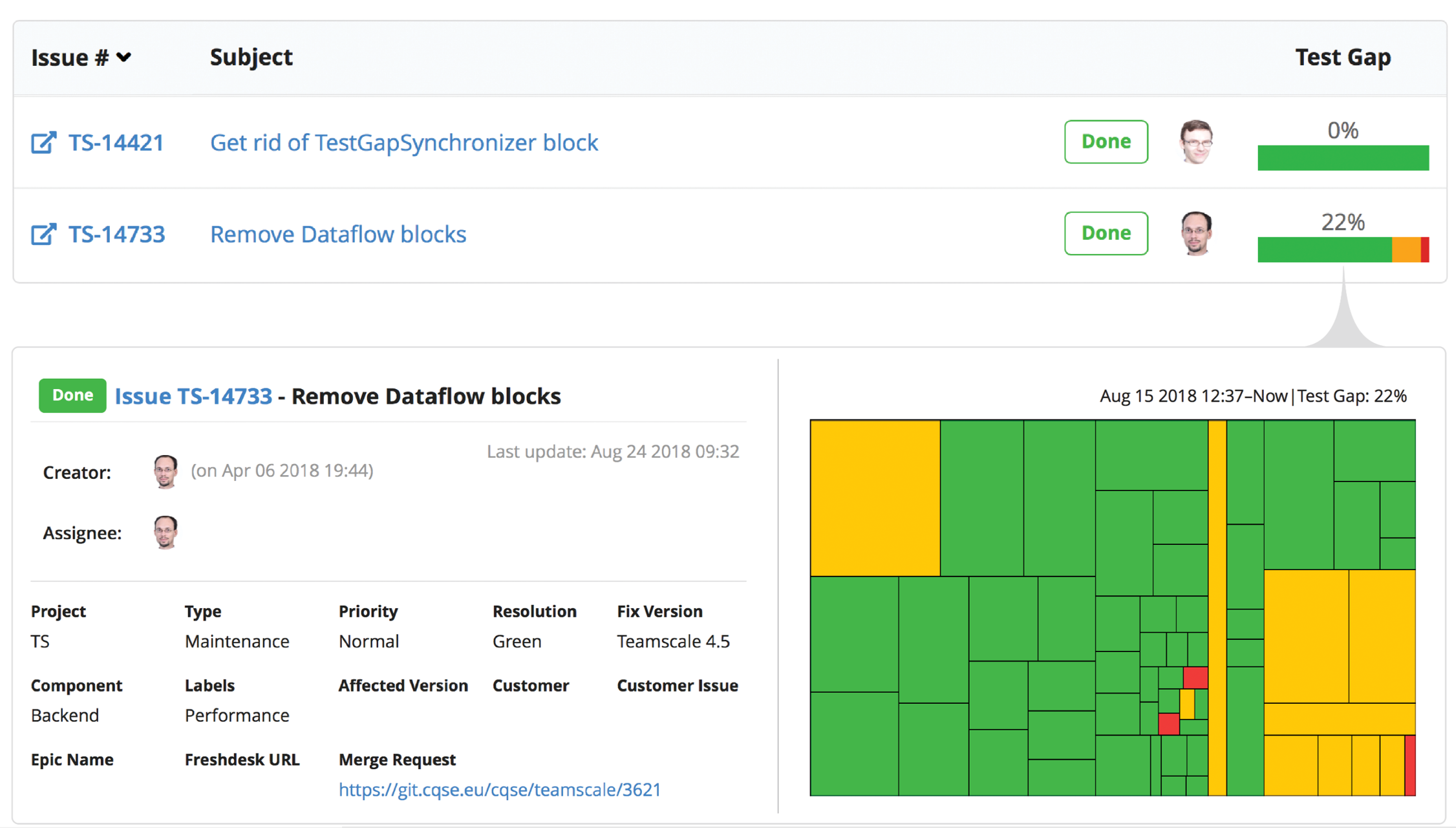
Teamscale can even aggregate Test Gaps for your Jira issues or Azure DevOps work items so you can filter and prioritize them based on data from your issue tracker. A single tester can easily find the Test Gaps relevant for the feature they are testing:
If You Want to Learn More
Then deep-dive into this technique by watching our webinar on Test Gap analysis, including a live demo at 39:48.
Getting Started
To see Test Gaps in Teamscale, follow our getting-started guide.
Find out, Which Code Is (Not) Covered by Your Tests
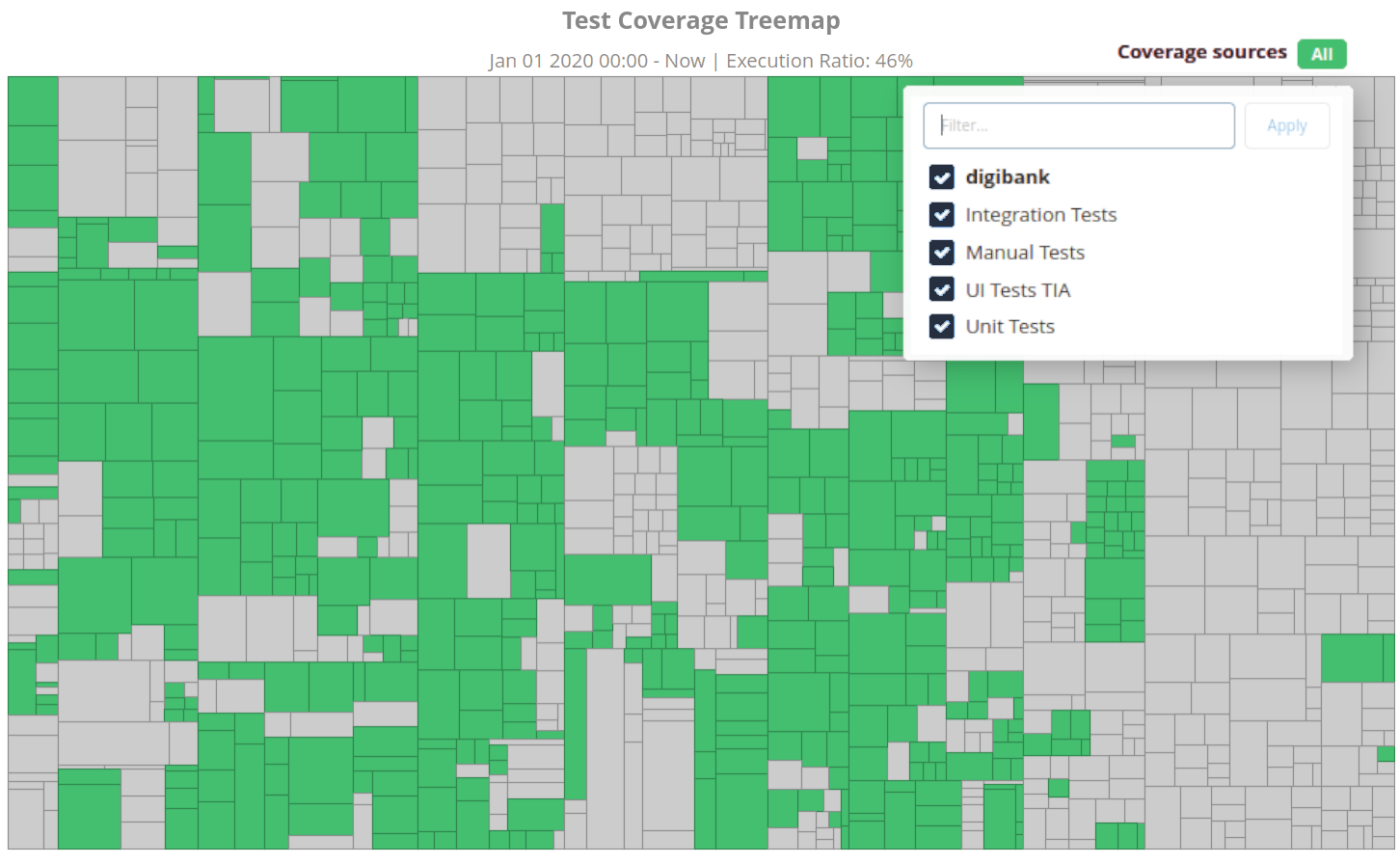
Most organizations only know the coverage of their unit tests. They have no idea which code their other test stages are covering, e.g. integration tests, end-to-end tests, manual tests, software- or hardware-in-the-loop tests. For most, seeing the coverage of these tests for the first time is a revelation: You can finally spot areas where you thought you had coverage, but do not.
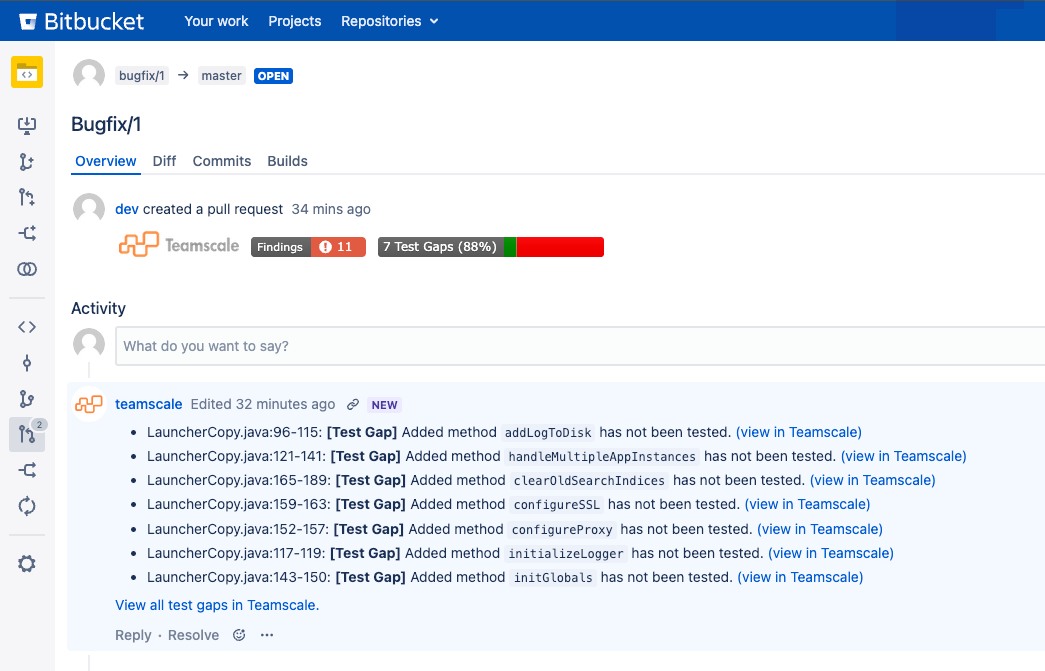
Integration into pull requests puts test coverage information at developers' fingertips:
You can even correlate test coverage with other metrics, e.g. to find out which code is complex, often has bugs and is still missing tests.
Getting Started
To see your test coverage in Teamscale, follow our guide to record coverage for any test stage or our special article on coverage for manual tests.
How Can QA Keep up with the Speed of Agentic AI?
AI agents are incredibly fast at generating code. Unfortunately, it's often buggy code, as many studies show. [3] [4] Historically grown test suites are often painfully slow and thus create a massive bottleneck for agentic development: Waiting hours or even days for your end-to-end test suite to complete completely negates the speed benefits of using AI agents. And not running your tests at all risks a rise in incidents caused by AI.
There is a better alternative: The key is running only the right tests for a given change. Those that actually have a chance to find bugs. This works because the vast majority of tests cannot find new bugs for any given change.
Teamscale speeds up verification of AI-developed changes by selecting an optimized test subset for each change that find 90% of bugs in as little as 2% of the test suite runtime. If the agent runs the tests by itself, it gets immediate feedback on new bugs and fixes them before a human needs to be involved.
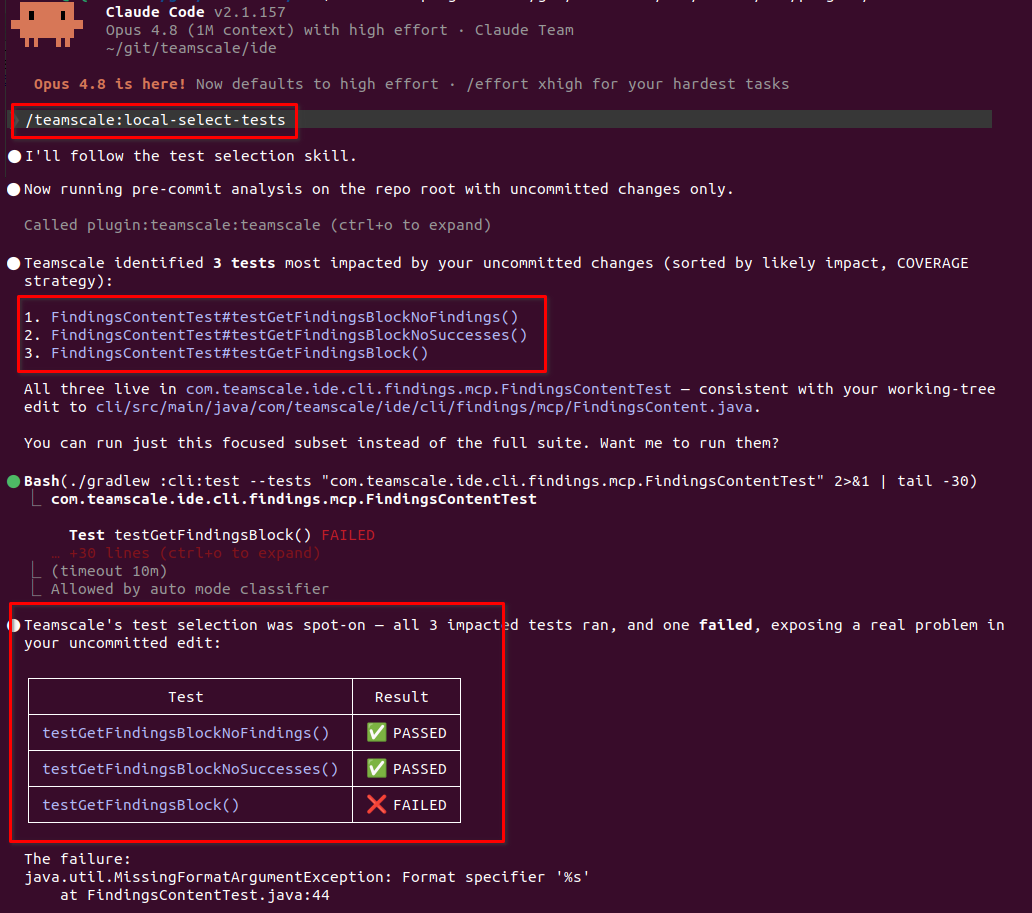
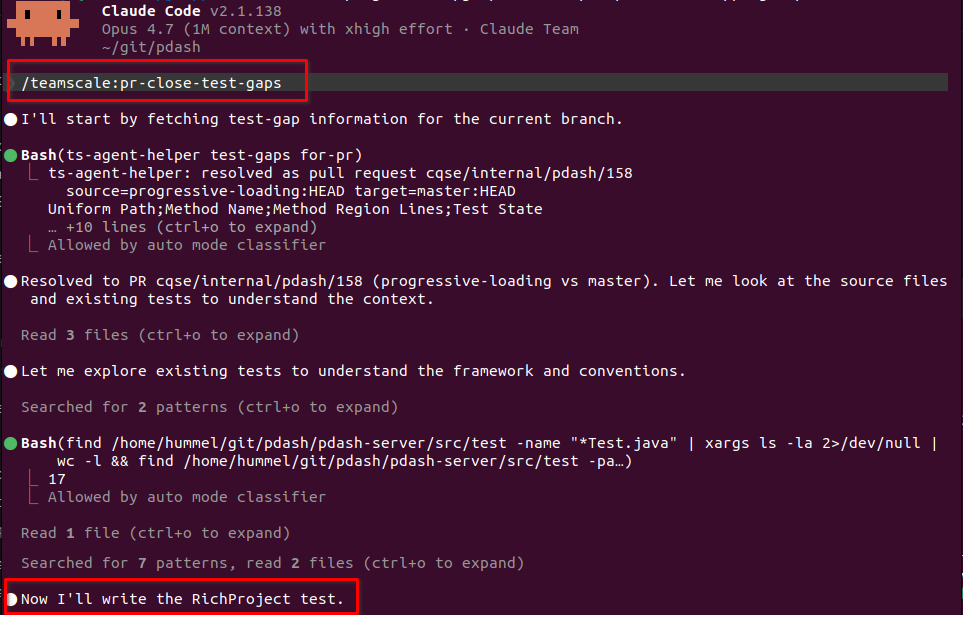
These agent skills ensure that the relevant existing tests have been executed, but new changes may still be under-tested. Test Gap analysis automatically flags all changed but untested code in AI-created pull requests and agents can use this information to proactively create new tests.
Getting Started
To use test suggestions and Test Gaps in your agentic coding workflows, follow our getting-started guide.
Shift Left and Save Time with Smart Test Suggestions
Fast feedback on new bugs reduces their repair costs and accelerates releases. Therefore, organizations aim to "shift-left" testing, conducting tests early and often, such as during pull requests or on feature branches. This practice, however, increases the frequency of tests and thus their cost, both in computing resources and employee time.
In contrast to this, the vast majority of tests cannot find new bugs for any given change. This makes frequent re-runs of painfully slow test suites an inefficient strategy.
To reduce costs and speed up feedback times, Teamscale offers smart test suggestions. This allows you to shift left while also keeping costs low.
These tests are suggested because they have a high chance to catch new bugs while also being quick to execute. Teamscale offers several test suggestion strategies with different cost-benefit trade-offs. The more data you feed into Teamscale, the better its test suggestions become:
- AI Test Clustering builds a smoke test suite from the content of your tests alone, so it needs no coverage data at all. It catches 90% of new bugs in only 13% of your test runtime.
- Similarity Scoring selects only tests that are terminologically similar to the changed code. Tests with names and identifiers that match the changed code are prioritized — terminological proximity is a strong predictor of relevance and bug-finding power. It catches 90% of new bugs in only 4% of your test runtime.
- Pareto Optimization generates an optimal smoke test suite that catches 90% of new bugs in only 11% of your test runtime.
- Test Impact analysis selects only tests that run through the changes you are currently testing. It catches 90% of new bugs in only 2% of your test runtime.
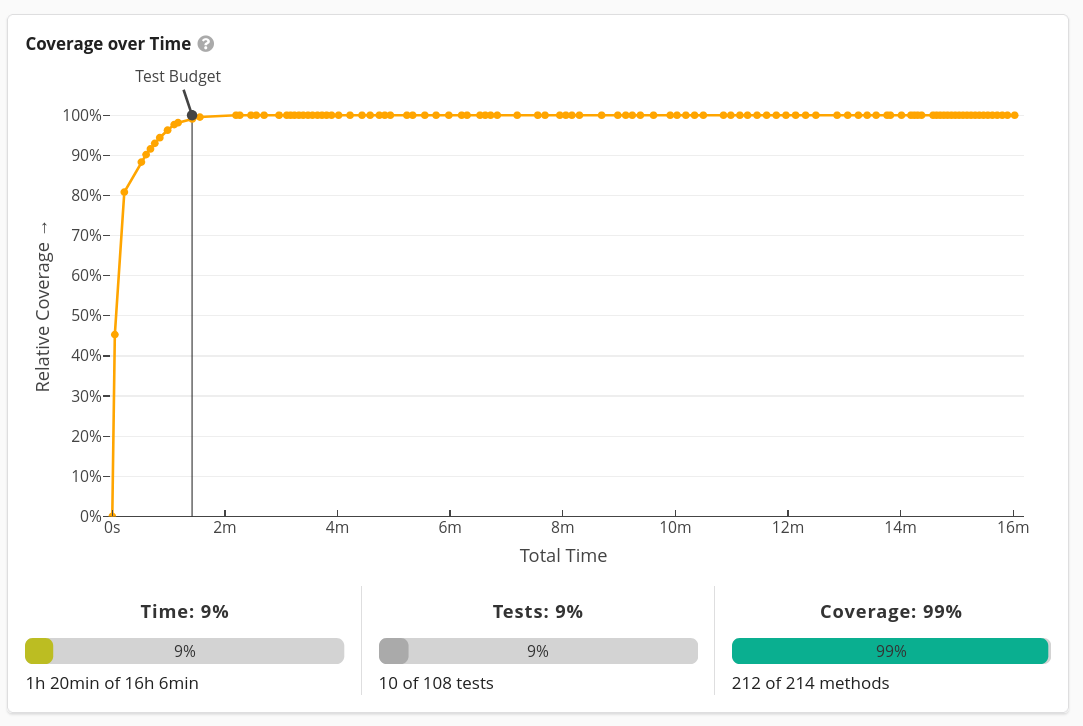 Pareto Optimization achieves almost the same test coverage (y-axis) as the full test suite in only a fraction of your usual test runtime (x-axis) by intelligently selecting which tests to run.
If You Want to Learn More
Then deep-dive into this technique by watching our webinar on test suggestions, including a live demos of Pareto Optimization at 30:11 and Test Impact analysis at 50:22.
Getting Started
For all approaches, follow our getting-started guide.
What's the Root Cause of Your Production Defects?
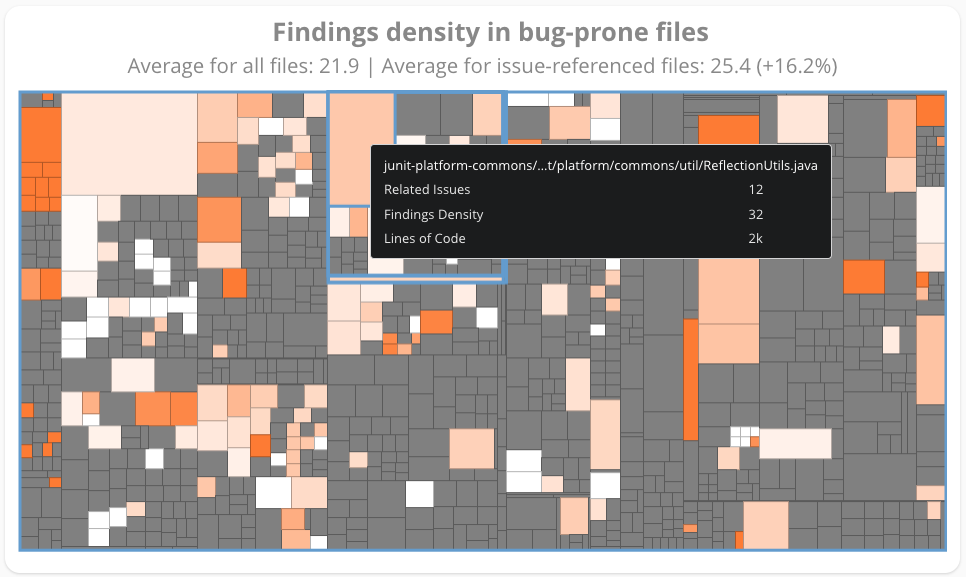
Many teams observe rising defect rates, but few know for sure what causes them. Teamscale's defect analysis combines defect data from issue trackers like Jira, Azure DevOps, etc. with code changes to highlight areas of the source code that are most defect-prone.
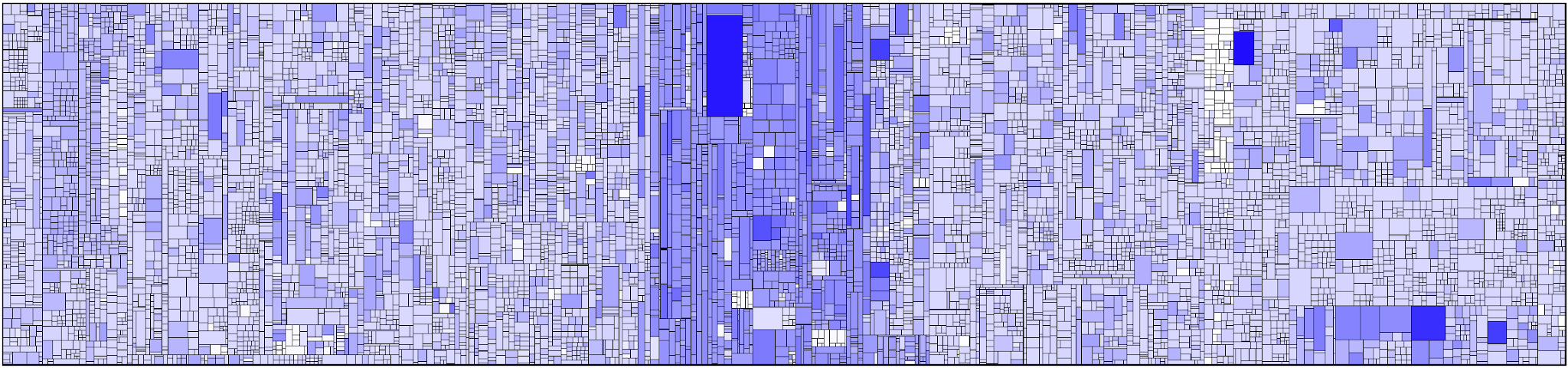
This defect density can then be combined with a number of quality metrics like test coverage, code complexity, static analysis findings, etc. Teamscale compares these metrics between code affected by bugs vs. code not affected by bugs to identify the metrics that correlate strongly with high defect density. Based on this, you can easily find the root causes for a large number of your defects.
Getting Started
To find the root causes of your own defects, follow our guide to defect root cause analysis.
Steer Improvements with Sensible KPIs
Teamscale helps you improve your test coverage where it matters the most and in a cost-effective way.
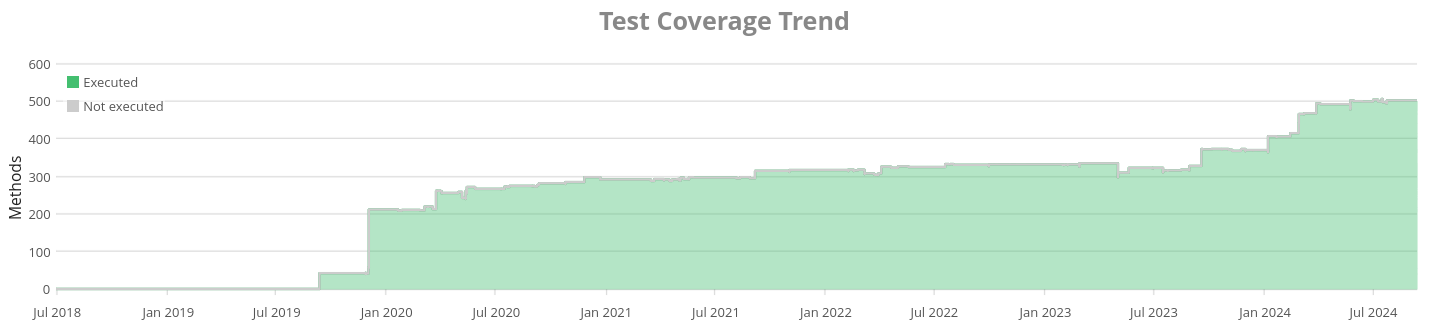
As KPIs we suggest you track:
- the long-term trend of your test coverage for each test stage and overall
- how many Test Gaps remain unaddressed in your pull requests
- whether you covered the code changed for each user stories, defect, epic, etc.
These KPIs are most effective when Teamscale continuously provides feedback to testers and developers alike, enabling all testing participants to increase test coverage with minimal effort.
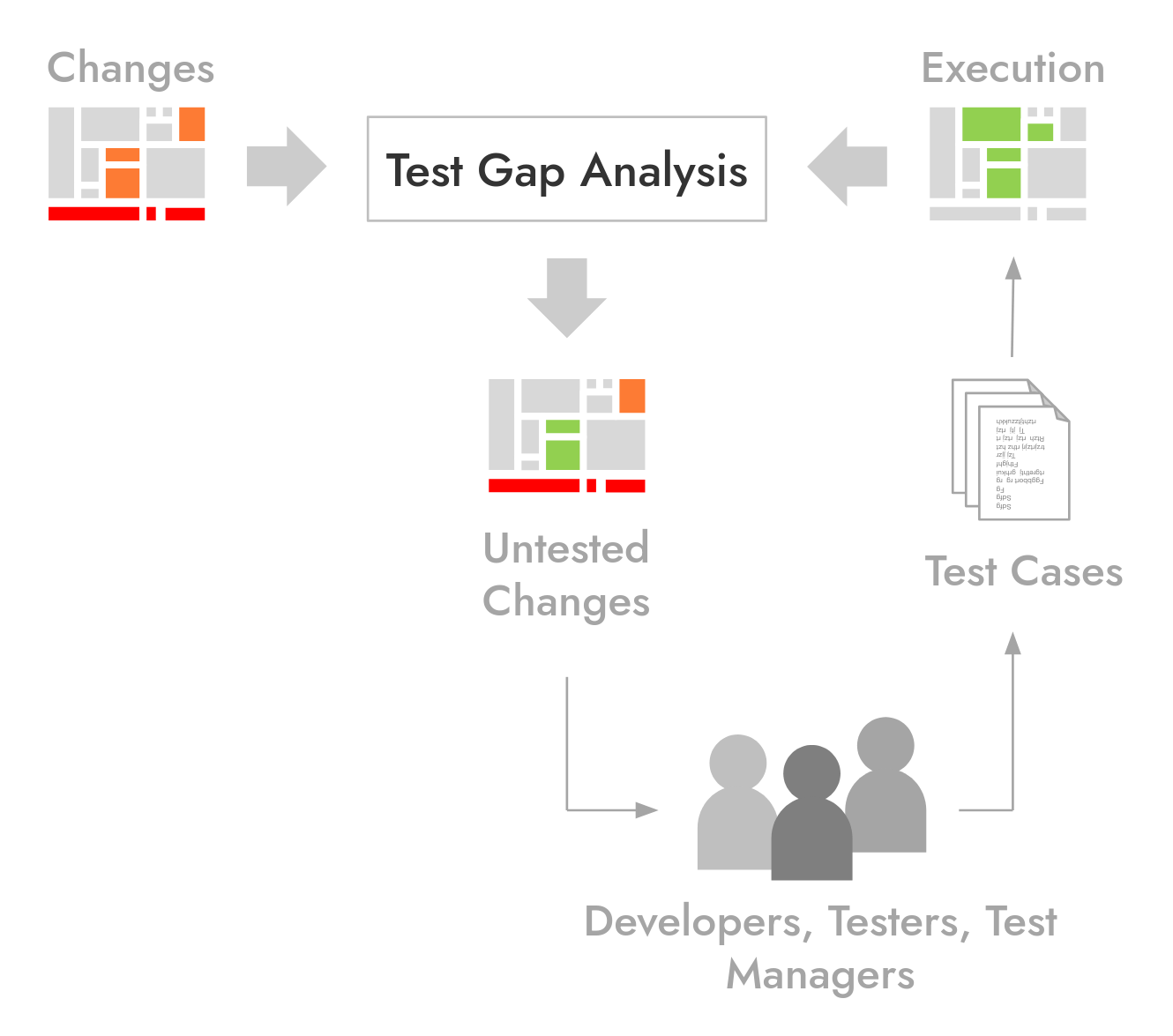
This allows you to shift-left and address Test Gaps as early as possible, i.e. in every pull request, with every user story, each sprint. To organize this, we recommend the following process:
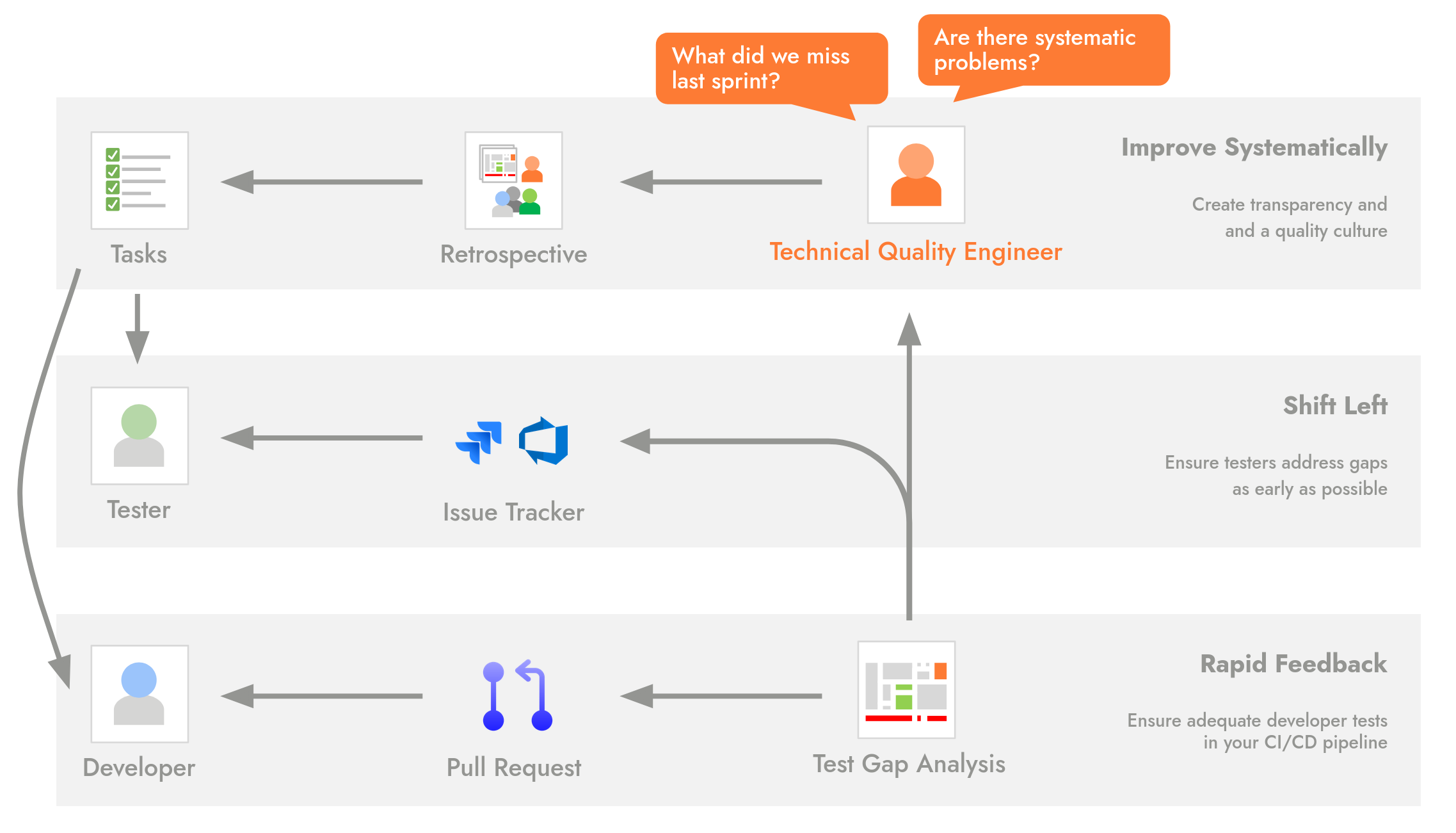
- Teamscale's pull request integrations send feedback to developers about the effectiveness of CI/CD pipeline tests.
- Our issue tracker integrations send feedback to testers about Gaps in non-pipeline tests, like manual and end-to-end tests run on dedicated test environments.
- Regular quality retrospectives reveal gaps that slipped through the safety net and address systematic problems. E.g. code for which writing tests is too hard or missing communication between testers and developers.
The central role of the Technical Quality Engineer monitors the KPIs and ensures that this process keeps running smoothly. They lead the retrospectives and prepare results with Teamscale's reporting feature.
Getting Started
If you need help implementing this process in your organization, contact us!
Further Reading:
- Did We Test Our Changes? Assessing Alignment between Tests and Development in Practice
S. Eder, B. Hauptmann, M. Junker, E. Juergens, R. Vaas, and K-H. Prommer. - In German: Erfahrungen mit Test-Gap-Analyse in der Praxis
Haben wir das Richtige getestet? E. Juergens, D. Pagano