
Exclusion Rules View
The Exclusion Rules view shows all rules that have been configured to ignore specific violations. Rules can originate from actions taken in Teamscale (e.g., marking a violation as tolerated or false positive) or be imported from the SCA tool (e.g., JFrog Xray).
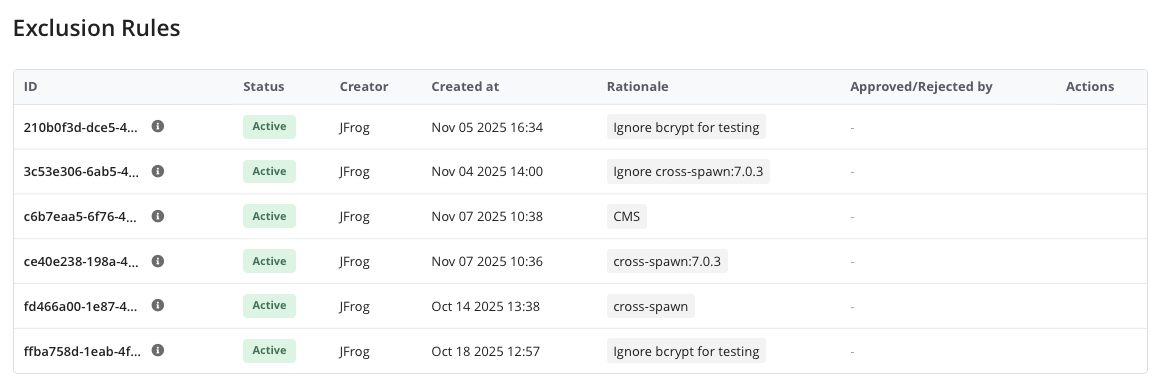
Rule Details
Each rule in the table includes the following columns:
| Column | Description |
|---|---|
| ID | The unique identifier of the rule. Hovering over the (i) icon shows additional details such as the matched vulnerability ID, build, components, and flagging type. |
| Status | The current state of the rule: Active, Pending, Approved, or Rejected. |
| Creator | The origin of the rule (e.g., the user who created it or the SCA tool it was imported from). |
| Created at | When the rule was created. |
| Rationale | The reason provided for ignoring the violation. |
| Approved/Rejected by | The user who approved or rejected the rule and when the decision was made. Only shown when the exclusion approval workflow is enabled. |
| Actions | Approve, reject, or delete the rule (depending on the user's permissions and the rule's state). |
Rule Matching
An exclusion rule can match violations based on any combination of:
- Vulnerability ID: A specific CVE or Xray issue, or any vulnerability.
- Build: A specific build (and optionally a specific version), or any build.
- Components: Specific library components and versions, or any component.
- Watch Name: The Xray Watch that triggered the violation.
Approval Workflow
When the exclusion approval workflow is enabled for Software Composition violations, newly created rules enter a Pending state. A user with the Approve permission can then approve or reject the rule. When approving or rejecting, a rationale must be provided. Approved rules take effect and are synchronized to the SCA tool. Rejected rules remain inactive.
See Exclusion Approval Workflow for how to enable this feature.
Deleting Rules
Rules created in Teamscale can be deleted. For rules imported from the SCA tool, deletion is only possible if the Enable Deletion of Imported Exclusion Rules option is enabled in the connector configuration. When an imported rule is deleted, the deletion is synchronized back to the SCA tool.