Test Suggestions Perspective
The Test Suggestions perspective helps you select the most relevant tests for your project. It offers two complementary approaches:
- Change-Based Test Suggestions (Similarity Scoring and Test Impact analysis) recommend tests that cover recently changed or issue-related code, helping you focus testing effort on risky areas.
- Change-Independent Test Suggestions (AI Test Clustering and Pareto Optimization) help you build a smoke test suite from your tests, independent of any code change, either by covering a wide range of functionality (AI Test Clustering, which is content-based) or by maximizing code coverage within a time budget (Coverage-based Pareto optimization).
Both views are described in the following:
Prerequisite for Test Impact analysis and Pareto optimization: Testwise Code Coverage
The coverage-based rankings—the change-independent Coverage-Based Suggestions tab and the change-based Tests Covering Risks tab—require testwise code coverage to be uploaded to Teamscale. This coverage data links individual tests to the methods they execute. See Providing Testwise Coverage for more details on uploading testwise coverage data.
However, for both change-based and change-independent test suggestions, Teamscale also provide approaches that work without testwise coverage.
- Similarity Scoring implements change-based test suggestions (the Related Test Implementations tab) based on similarity between the code changes and tests.
- AI Test Clustering implements change-independent test suggestions (the Content-Based Suggestions tab) based on how similar the content of test cases is.
Change-Based Test Suggestions
Change-based test suggestions help you find tests that are relevant to recent code changes. The workflow consists of defining which code is risky, selecting test candidates, and then reviewing the suggested tests.
Defining Risks
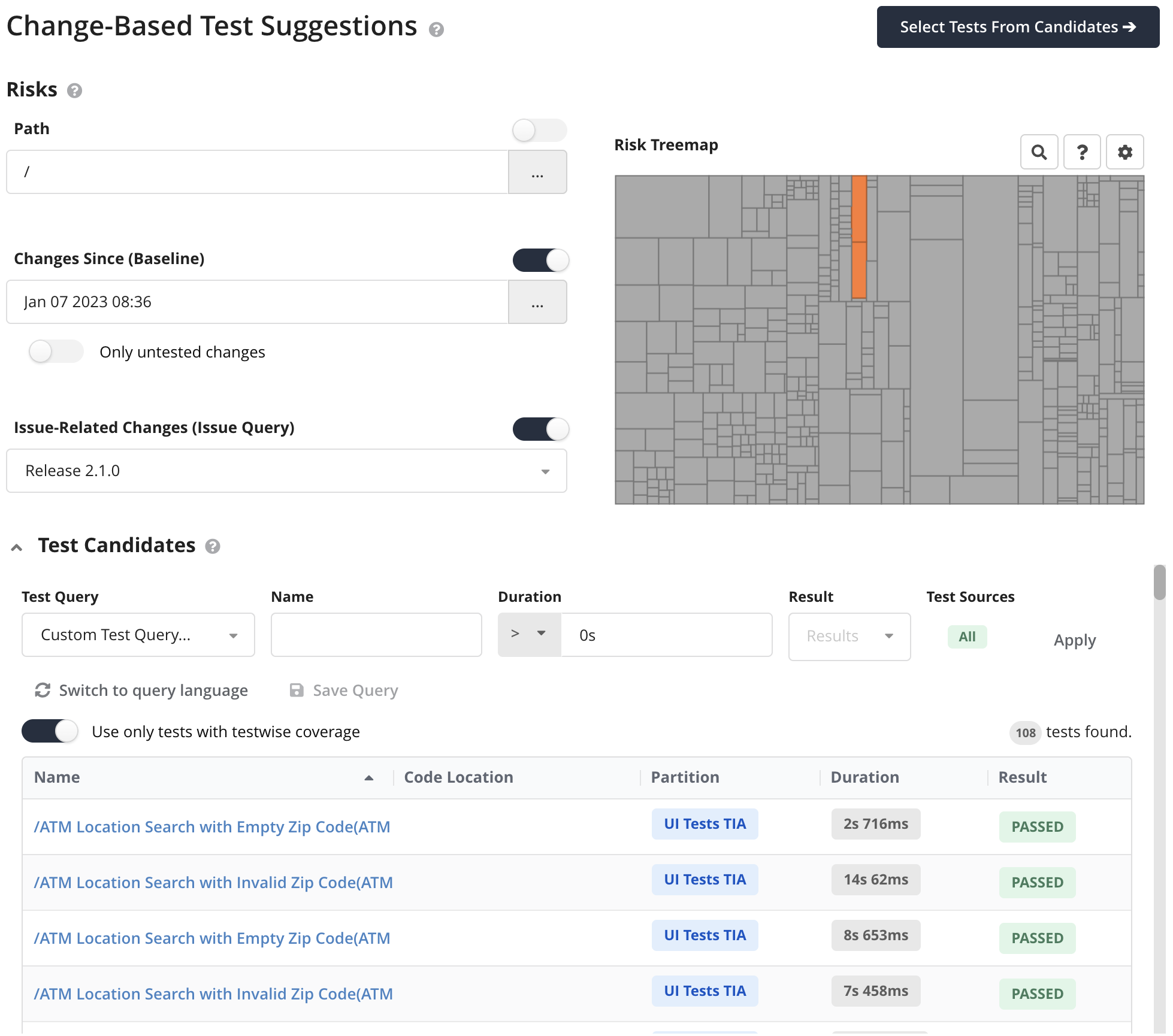
The left panel lets you define what constitutes risky code by enabling one or more of the following filters:
- Path: Restrict the analysis to a specific code location.
- Changes Since (Baseline): Consider all code changed since a given commit or timestamp. You can further narrow this to only untested changes to focus on test gaps.
- Issue-Related Changes (Issue Query): Include code that was changed to implement the selected issues.
The Risk Treemap on the right visualizes the selected risks. Orange areas represent risky (changed/untested) code and gray areas are unchanged.
Selecting Test Candidates
The Test Candidates section at the bottom lets you define which tests Teamscale can choose from. You can filter candidates by test query, name, duration, result, and test sources. The toggle Use only tests with testwise coverage restricts candidates to tests that have testwise coverage data available.
Only tests with an identified test implementation or with testwise coverage can become candidates. Teamscale cannot rank a test that has neither, because every ranking needs either the test's source code or its coverage. Uploaded test executions that Teamscale could match to neither are therefore left out, and the candidate table reports how many were excluded.
Once you have defined your risks and candidates, click Select Tests From Candidates to start the analysis.
Results: Related Test Implementations (Similarity Scoring)
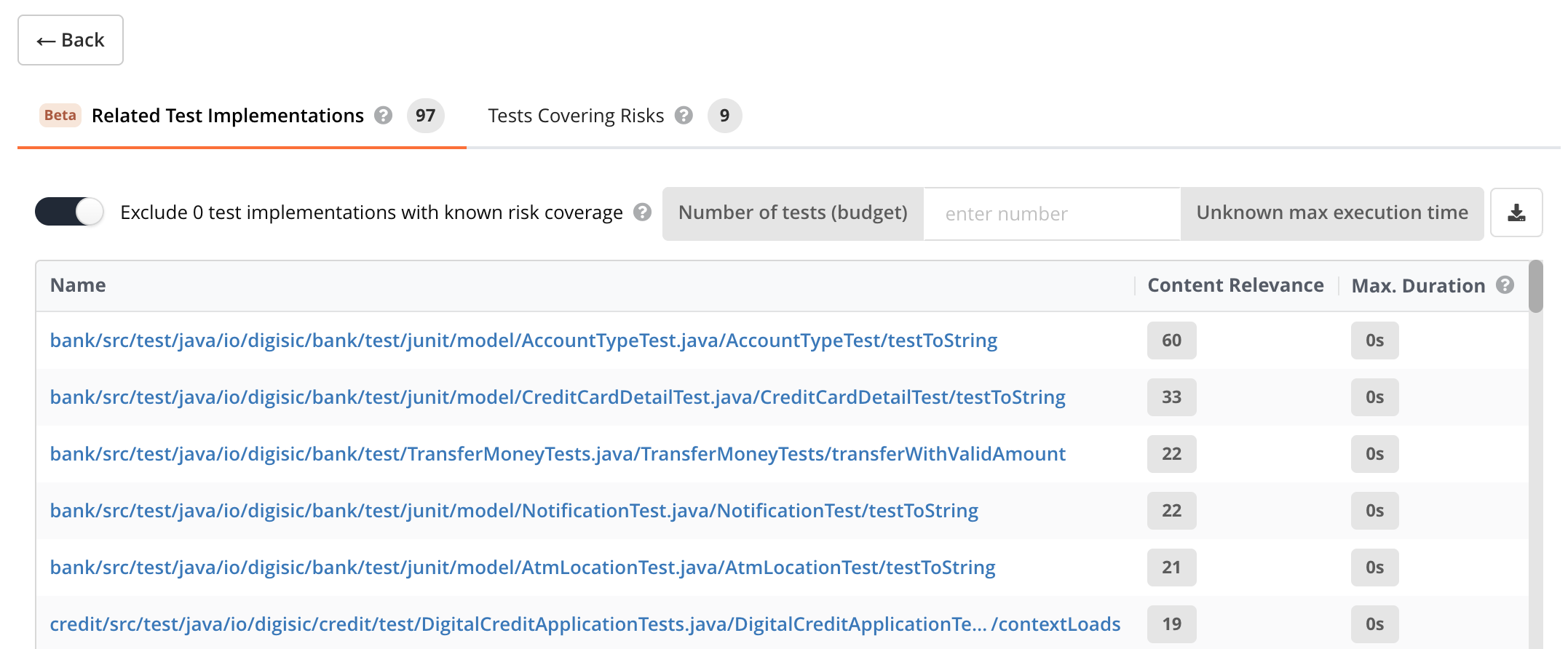
The Related Test Implementations tab shows tests whose content is terminologically similar to the risky code. This technique is called Similarity Scoring and does not require testwise code coverage. Each test is scored by Content Relevance—a higher score means greater textual similarity.
You can optionally exclude tests that have testwise coverage available and are known to cover the risks with the Exclude N tests with known risk coverage toggle. These tests are listed in the Tests Covering Risks tab. So by default, these tests are not repeated on this tab.
You can select a subset of the list with the Number of tests (budget) selector. If the runtime of each test case in the list is known, the total test runtime of the selection is shown next to the selector.
Similarity Scoring works with any tests that Teamscale recognizes as test implementations or tests from user-defined file-based test implementations from otherwise unsupported frameworks.
Stop Words
Before processing tests and code changes for Similarity Scoring, Teamscale removes so-called stop words. These are words like public, import or void that do not help match tests to a code change. You can change the stop words used for a particular programming language by providing a stop word list file. Place a UTF-8-encoded text file named <language>.txt (for example, kotlin.txt) into the stop-words directory relative to the Teamscale installation or working directory. The file should contain one stop word per line—typically language keywords, common standard library identifiers, and other terms that appear frequently across all code in that language. Teamscale picks up the file automatically on the next restart.
Results: Tests Covering Risks (Test Impact Analysis)
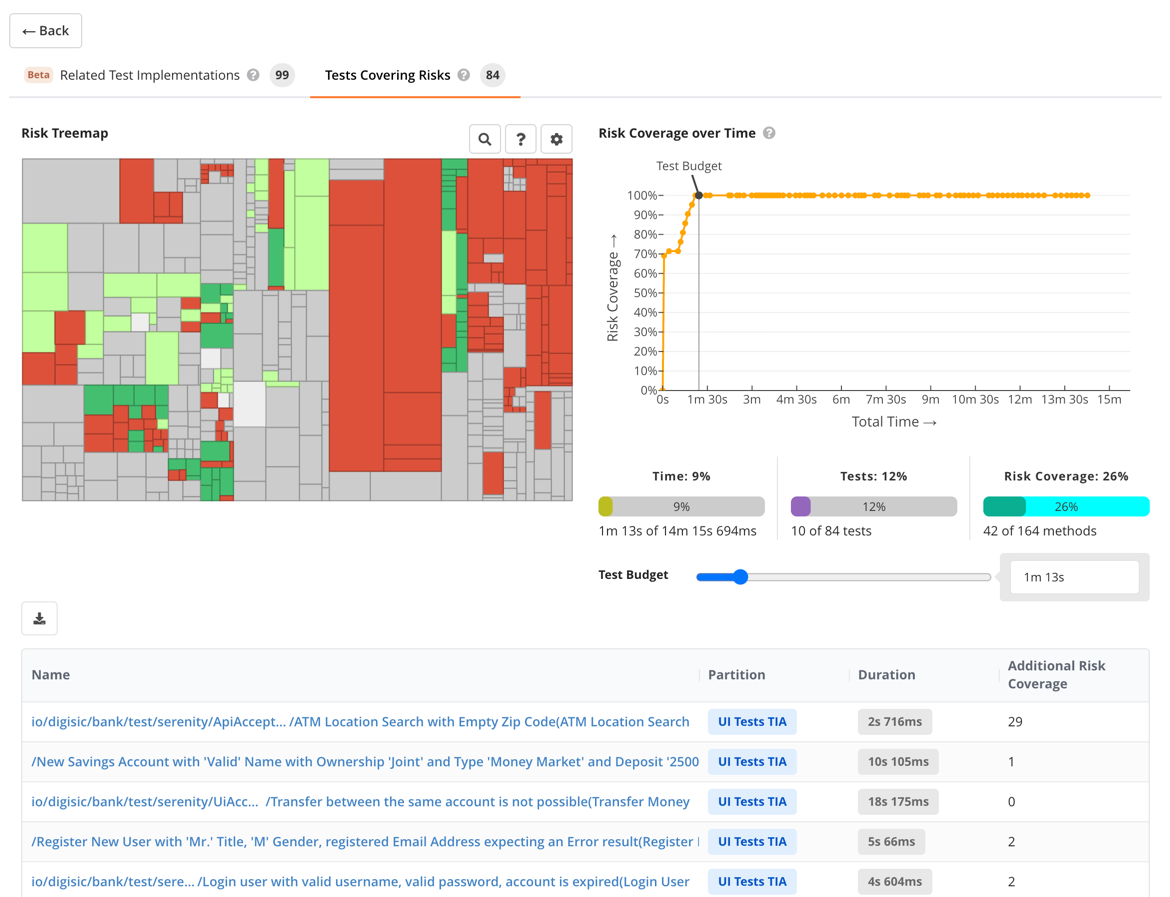
The Tests Covering Risks tab is available when testwise code coverage has been uploaded. It shows tests that have actual coverage of the risky methods. This view includes:
- Risk Treemap: Shows which risky methods are covered (green) vs. uncovered (red/orange) by the suggested tests.
- Risk Coverage over Time: A Pareto curve showing how risk coverage increases as more tests are added. The curve flattens over time, illustrating diminishing returns.
- Test Budget: A slider to constrain the total execution time. The statistics below show the resulting time, number of tests, and risk coverage as percentages.
- Test Table: Lists suggested tests with their partition, duration, and the number of additionally covered risky methods (Additional Risk Coverage).
Change-Independent Test Suggestions
Change-independent test suggestions help you build a smoke test suite from a set of candidate tests, independent of any particular code change. Teamscale offers two complementary rankings of the candidates, shown on separate result tabs:
- Content-Based Suggestions (AI Test Clustering) rank tests by the dissimilarity of their implementations, so the top-ranked tests cover a wide range of functionality. This ranking does not require testwise coverage, so it can be used out-of-the-box.
- Coverage-Based Suggestions (Pareto Optimization) rank tests so that code coverage is maximized for any given time budget. This ranking requires testwise coverage.
Selecting Candidate Tests
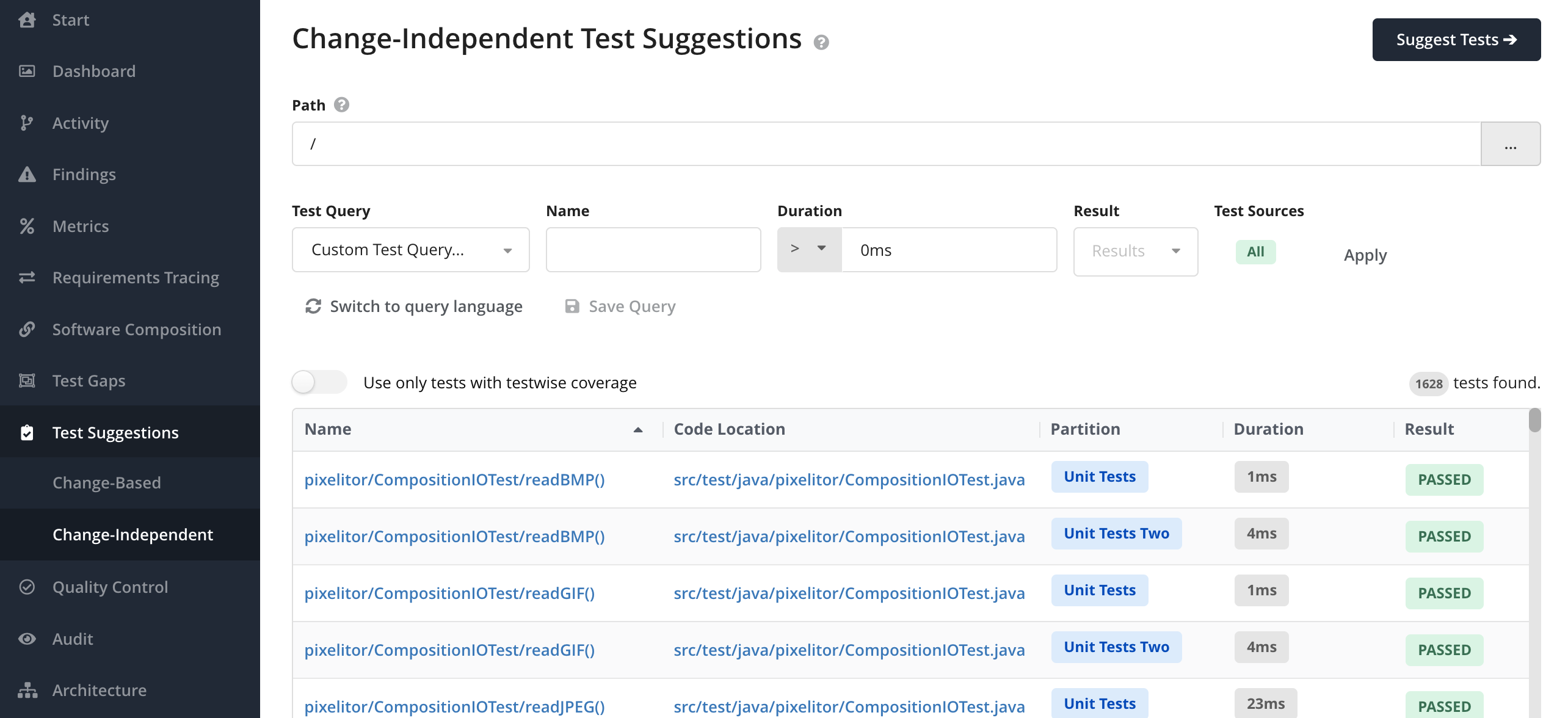
Use the test query filter to find the tests that should be considered as candidates. You can further filter candidates by name, duration, result, and test sources. The table shows each candidate's name, code location, partition, duration, and result.
Only tests with an identified test implementation or with testwise coverage can become candidates. Teamscale cannot rank a test that has neither, because every ranking needs either the test's source code or its coverage. Uploaded test executions that Teamscale could match to neither are therefore left out, and the candidate table reports how many were excluded.
The Path field restricts the analysis to a code location. It applies to the Coverage-Based Pareto optimization only. Only coverage from this path is used when ranking the tests.
Once you have defined your candidates, click Suggest Tests to compute both rankings and open the results.
Results: Content-Based Suggestions (AI Test Clustering) Beta
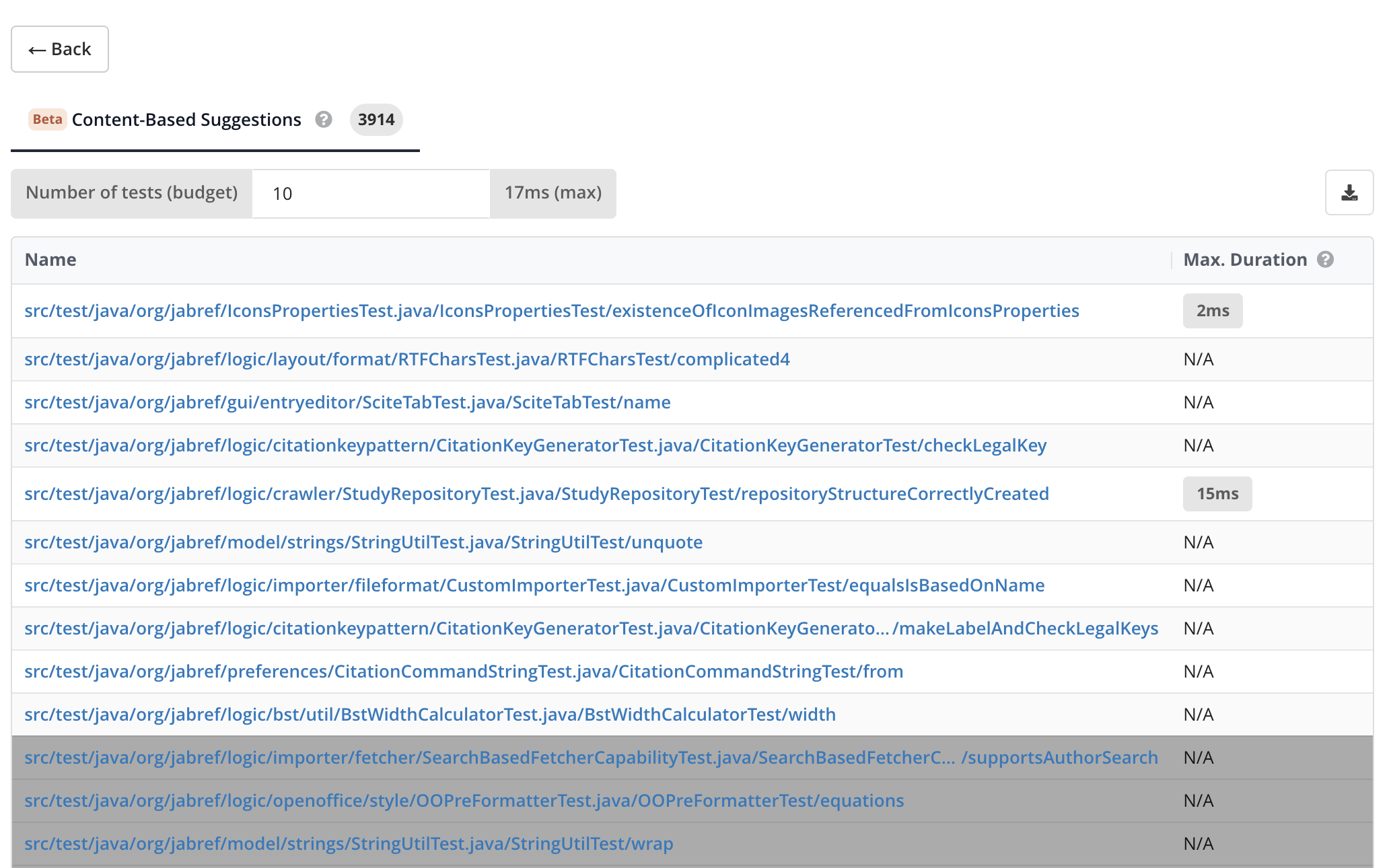
The Content-Based Suggestions tab ranks tests by the dissimilarity of their implementations so that the top-ranked tests cover a wide range of functionality. Teamscale uses an AI embedding model to compare the test code and detect similar or redundant tests, so this ranking needs no testwise coverage. The embedding model is configured under AI Model Providers in the Admin perspective. It does require that Teamscale recognizes the implementations of your tests since the test source code is used to determine redundancy. See AI Test Clustering for the use cases this ranking supports and how to validate a reduced test suite.
You can select a subset of the list with the Number of tests (budget) selector. The maximum execution time of the selection is shown next to the selector. The table shows each test's name and its Max. Duration (the longest duration the test has across partitions). When testwise coverage is available, an Additional Coverage column shows how many methods each test covers beyond all higher-ranked tests. Tests beyond the selected number are visually de-emphasized. Use Download CSV to export the selected tests.
Results: Coverage-Based Suggestions (Pareto Optimization)
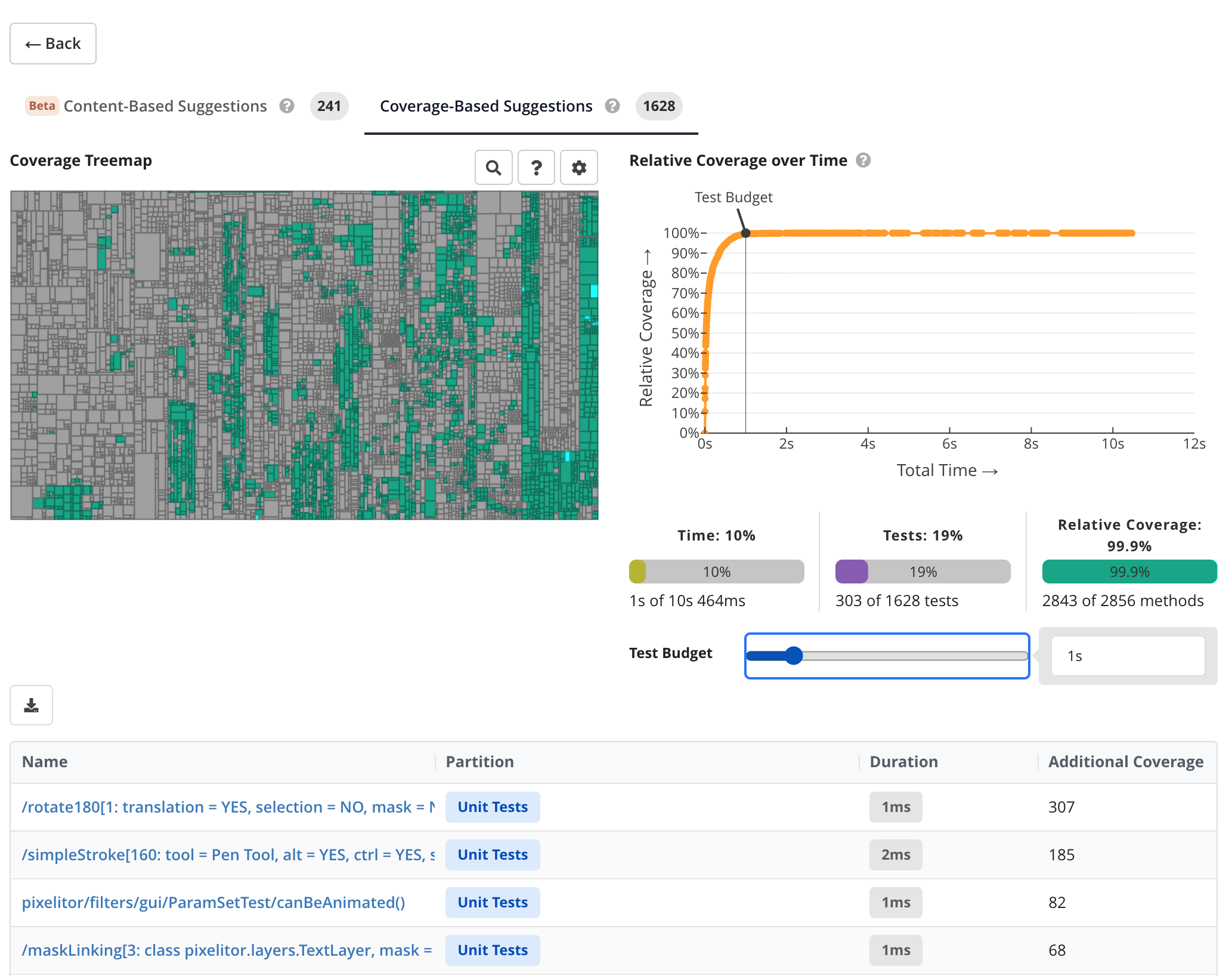
The Coverage-Based Suggestions tab is available when testwise code coverage has been uploaded. It ranks tests so that code coverage is maximized for any given time budget. This view includes:
- Coverage Treemap: Shows which methods are covered (green) and uncovered (gray) by the in-budget tests.
- Relative Coverage over Time: A Pareto curve showing how coverage increases as more tests are added. The curve flattens over time, illustrating diminishing returns.
- Test Budget: A slider to constrain the total execution time. The statistics show the resulting execution time, number of selected tests, and relative coverage.
- Test Table: Lists the ranked tests with their partition, duration, and the number of additionally covered methods (Additional Coverage).
Tests that exceed the configured time budget are visually de-emphasized in the table. Use Download CSV to export the ranked tests within the current budget.