
Update Notices for Teamscale 2026.7
2026.7 Deprecated IBM RTC/Jazz Connectors
The IBM RTC/Jazz issue tracker connector and the IBM RTC/Jazz requirements management connector are deprecated and will be completely removed with version 2026.9.
Action required: If you still connect a project to RTC/Jazz, please contact us before upgrading to 2026.9.
2026.7 Deprecated Crowd Authentication
The Crowd Server authentication option is deprecated and will be completely removed with version 2026.9.
Action required: If you authenticate your users via Crowd, switch to LDAP or single sign-on via SAML 2.0 or OpenID Connect before upgrading to 2026.9. If neither fits your setup, please contact us.
2026.7 Deprecated Legacy Code Mapping in Architectures
The Enable legacy code mapping option in the architecture editor is deprecated and will be completely removed with version 2026.9. It was introduced as a fallback to the mapping behavior of Teamscale 7.7 and earlier, where the include and exclude patterns of a component were evaluated independently of those of its parent components. This option was set for architectures created before Teamscale 7.8 and is off by default for architectures created afterwards.
Once the option is gone, all architectures are assessed with the current behavior: a type or file is mapped to a subcomponent only if the mappings of its parent components match it as well, and an exclude pattern of a component also applies to its subcomponents.
Action required: Manual action may be required if an architecture with the legacy mapping option contains nested components and the parent component has non-empty include/exclude patterns defined. In this case it is recommended to switch off the legacy mapping setting prior to the 2026.9 update and reworking the code mappings as follows. Widen the include patterns of the parent components so that they also match what their subcomponents map, and remove exclude patterns that you do not want to apply to the subcomponents. Use the Unmatched Types panel of the architecture editor to find code that is no longer mapped, and check the assessment for components that lost their content. If you need help with the migration, please contact us.
2026.7 Deprecated Xodus Storage Backend
The xodus value of the database.type option is deprecated and will be completely removed with version 2026.9.
Action required: If your teamscale.properties sets database.type=xodus, switch to the default rocksdb before upgrading to 2026.9.
2026.6 Security: TLS certificates for LDAP connections are now validated
Teamscale will now reject expired or untrusted certificates. Self-signed certificates must be added to the JVM Trust Store to connect to an LDAP server via HTTPS.
2026.6 Cppcheck Premium: MISRA C edition moved from 2023 to 2025
The Cppcheck Premium integration now uses the MISRA C:2025 edition instead of MISRA C:2023. Accordingly, the check IDs of all MISRA C rules change from premium-misra-c-2023-* to premium-misra-c-2025-*. Existing findings and their tolerations are carried over across the rename, and analysis profiles are migrated automatically on upgrade.
The three changes below, however, drop the enablement setting of individual rules, no matter whether you had explicitly enabled or disabled them. Tolerations are not affected.
Action required: If you have customized any of the rules or checks listed below, review and re-apply your settings after upgrading.
- Rules absorbed into other rules are removed: MISRA C:2025 merged rule 11.7 ("A cast shall not be performed between pointer to object and a non-integer arithmetic type") into rule 11.4, and rule 17.6 ("The declaration of an array parameter shall not contain the
statickeyword between the[ ]") into rule 17.5. The merged rules no longer exist as standalone checks and are removed from migrated profiles. If you had enabled only 11.7 or 17.6, enable 11.4 or 17.5 respectively to keep the corresponding coverage. - Directive 5.2 (deadlocks) resets to its default: MISRA C:2025 reports thread data races (Dir 5.1) and deadlocks (Dir 5.2) under two distinct directives, while the previous mapping in Teamscale covered both under Dir 5.1. The migration preserves your setting for Dir 5.1, whereas Dir 5.2 takes its default, which is off. If you rely on deadlock detection, enable Dir 5.2 manually.
- Checks removed by the Cppcheck update: The open-source check
iterators2("Same iterator is used with different containers (2)") was dropped in Cppcheck 2.21.0 and is removed from migrated profiles. It no longer produces findings and cannot be re-enabled, and there is no replacement.
2026.6 Removed Teamscale Jira Gadget
The Teamscale Jira Gadget, which allowed showing a Teamscale dashboard within a Jira dashboard, has been removed with version 2026.6.
2026.6 Deprecated Test Gap Overview widget
We are deprecating the Test Gap Overview widget. Its two main functions are now covered better by other widgets:
- List of partitions and their latest upload commit: View this information via the Included Coverage Uploads button on each Test Gap treemap widget, which opens a filterable dialog of all uploads considered in the treemap. If this is your only use case for the widget, you can simply delete it from your dashboards.
- Test Gap percentage as a big number: The Test Gap pie chart widget introduced in Teamscale 2026.5 shows the same number in an easier to read and visually more pleasing way. Replace the overview widget with a Test Gap pie chart widget.
Timeline:
- Starting with 2026.6, the widget shows a banner informing users about the deprecation.
- Six months after this release, the widget will no longer show its content, only its banner.
- Three months after that, the widget will be removed completely from all dashboards.
2026.4 Security: Teamscale now validates the OpenId Connect tokens using the identity provider's JSON Web Key Set (JWKS)
Action Required: Manual Configuration for OpenID Connect
To enable token signature validation, admins must manually provide the JWKS URL from their Identity Provider. Without this step, the new security validation will not be active.
Steps to Update:
- Go to Admin > Settings > Authentication
- Edit your OpenID Connect configuration
- Add your Identity Provider's JWKS URL and save
2026.4 Security: External Content dashboard widget sandboxed by default
The content rendered by the External Content dashboard widget now has sandbox="" set by default. This blocks scripts, popups, downloads, top-level navigation, form submission and same-origin access from within the embedded page. The change addresses a security risk where a malicious embedded site could redirect users (phishing), execute JavaScript (drive-by exploits) or trigger malicious downloads from within Teamscale.
As a consequence, embeds that rely on JavaScript (for example, dashboards from other tools) will no longer render. If you need such embeds, an administrator can opt back in by enabling Allow dynamic content in External Content Widget under Admin > Settings > Server Settings > Dashboards.
Security note: enabling this option allows embedded pages to execute arbitrary JavaScript and access their own origin. Only enable it if all URLs configured in External Content widgets across all dashboards are trusted.
2026.4 Renamed Java profiler Docker image to cqse/teamscale-java-profiler
Teamscale's Java profiler was previously published under the name cqse/teamscale-jacoco-agent. To ensure consistent and clear naming of our profilers, we renamed it to cqse/teamscale-java-profiler. This brings it in line with the naming for our .NET and JavaScript profilers. Thus, it is required to change the name of the Docker image you use to cqse/teamscale-java-profiler. The versioning scheme remains the same.
2026.4 Oldest supported IntelliJ raised to 2023.3
The oldest supported version for the IntelliJ plug-in was raised to version 2023.3.
2026.4 Default log4j2.yaml has changed
The default log4j2.yaml shipped under config/log4j2.yaml has changed in 2026.4. If you have customized this file in your installation, please review the new default and merge in your changes manually — otherwise the new defaults will be lost on upgrade.
You can download the new default configuration here:
2026.3 Removed PDB processing and related services
The ability to upload PDBs and raw .NET trace files for tracking line coverage has been removed with version 2026.3.
2026.2 Removed AllowAll Authenticator
For security reasons, the AllowAll Authenticator has been removed with version 2026.2.
2026.1 Java 25 Required (Teamscale server application)
Starting with version 2026.1, the Teamscale server will require Java 25 to be executed.
Action required: In case you are not using a Docker-based deployment, please make sure to update the JRE used for executing Teamscale to Java 25.
Re-Analysis when Upgrading
- When updating from 2026.7.x, drop-in.
- When updating from 2026.6.x or earlier, a full re-analysis via backup is required.
What's New for Teamscale 2026.7
AI Features
AI-Assisted Architecture Modeling
Starting with this release, AI assists you interactively in creating and maintaining architecture specifications. You no longer have to build a specification from scratch to use Teamscale's architecture conformance analysis. Teamscale can now propose an initial architecture specification for a project inferred from its code and existing dependencies. Users can choose whether to generate the component structure only or to additionally infer the allowed and forbidden dependency policies between the components. In addition, users can add textual hints in free text how the resulting architecture should look like which the AI will take into account.
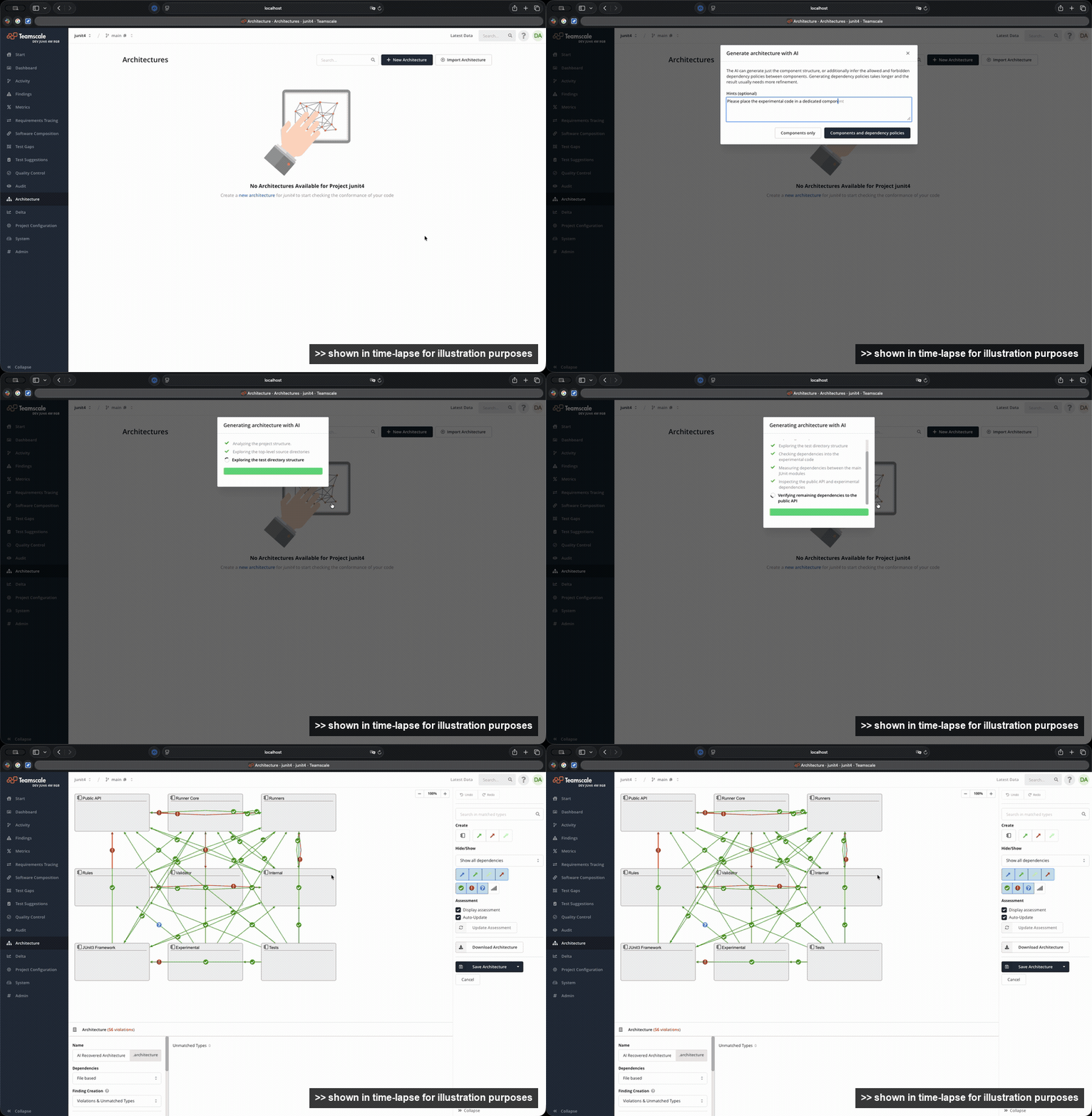
In addition to the initial creation, the new AI Refine Architecture button in the architecture editor allows to change existing architecture models based on a natural language description of the desired changes. The AI applies the requested changes to the architecture you currently have open, and afterwards summarizes what it changed.
Overall, this new AI support greatly lowers the barrier of entry for using Teamscale's architecture modeling, unlocking the benefits of continuous architecture conformance assessment.
Review Agent Benchmark
Review agents differ in how helpful their comments are and in what they cost, and the same agent performs differently on different models. The new Agent Benchmark view in the AI Assistance perspective reports helpfulness and cost per agent and model, based on the reviews your agents have already produced and the ratings your developers gave the individual comments.
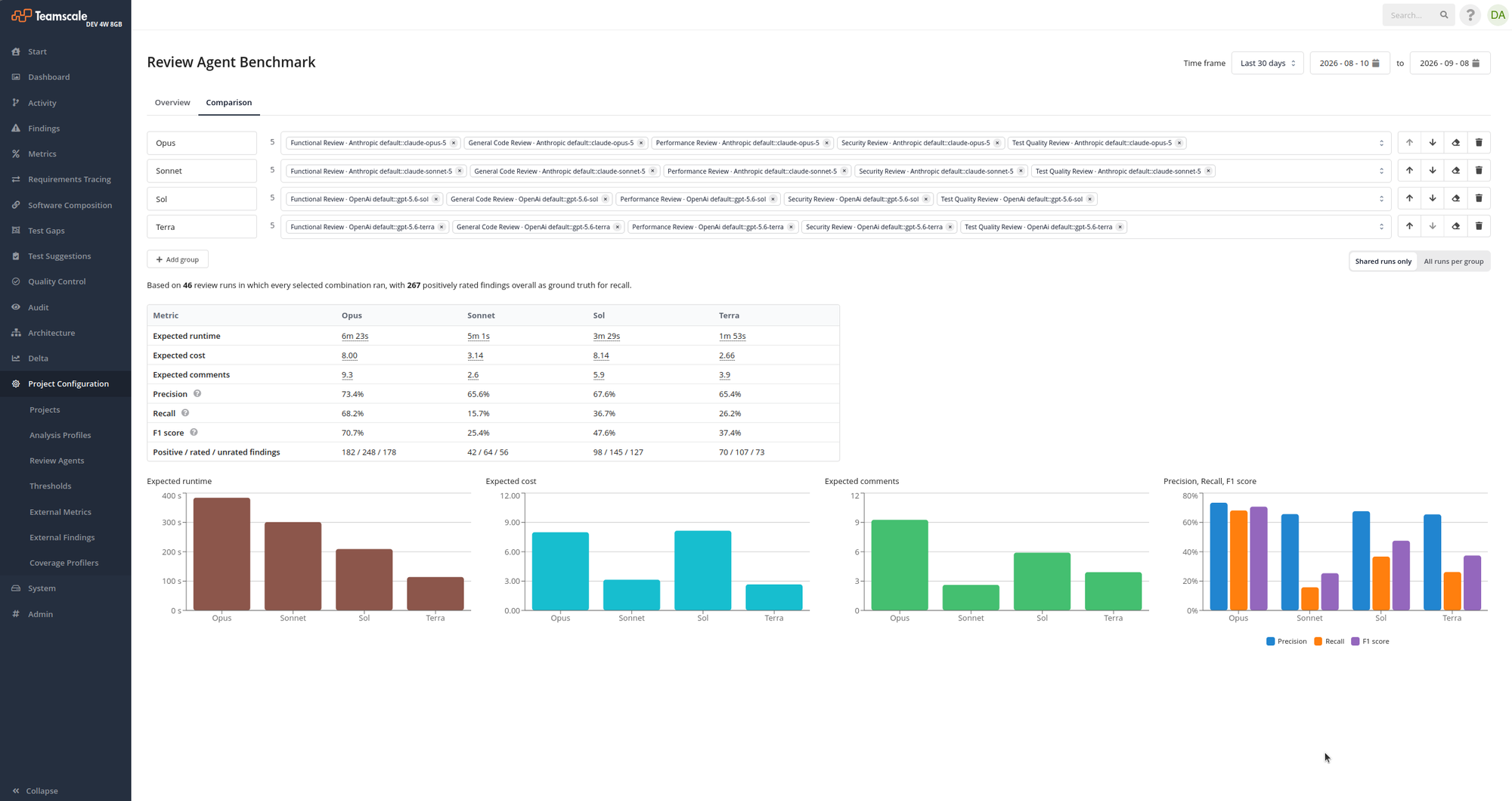
Comparing agent and model combinations side by side tells you which agents to keep linked to a project and whether a cheaper model reviews just as well, so you can tune your setup on data from your own code base.
Agentic Reviews from Bitbucket Data Center
Merge request authors can now trigger a review from Bitbucket Data Center by posting /teamscale review on the pull request, as already possible on GitLab. Enable this with the option Enable Agentic Reviews for merge requests on the project's Bitbucket Data Center connector. The trigger is delivered through the repository's webhook, which must include the Pull request: Comment added event.
Connector options decide whether the review comes back as inline pull request comments or as a Teamscale Agentic Review Code Insights report.
See Triggering a Review from the Code Collaboration Platform for details.
Additional Improvements
- AI Assistance is now a top-level perspective, collecting the Review Agents, Agent Benchmark, AI Log, and AI Usage views that previously sat in the project configuration.
- Claude Code Plugin: The new
/teamscale:issue-close-test-gaps <ticket>skill generates tests for the test gaps of an entire issue, including its child issues.
Web Interface
Redesigned Commit Details View
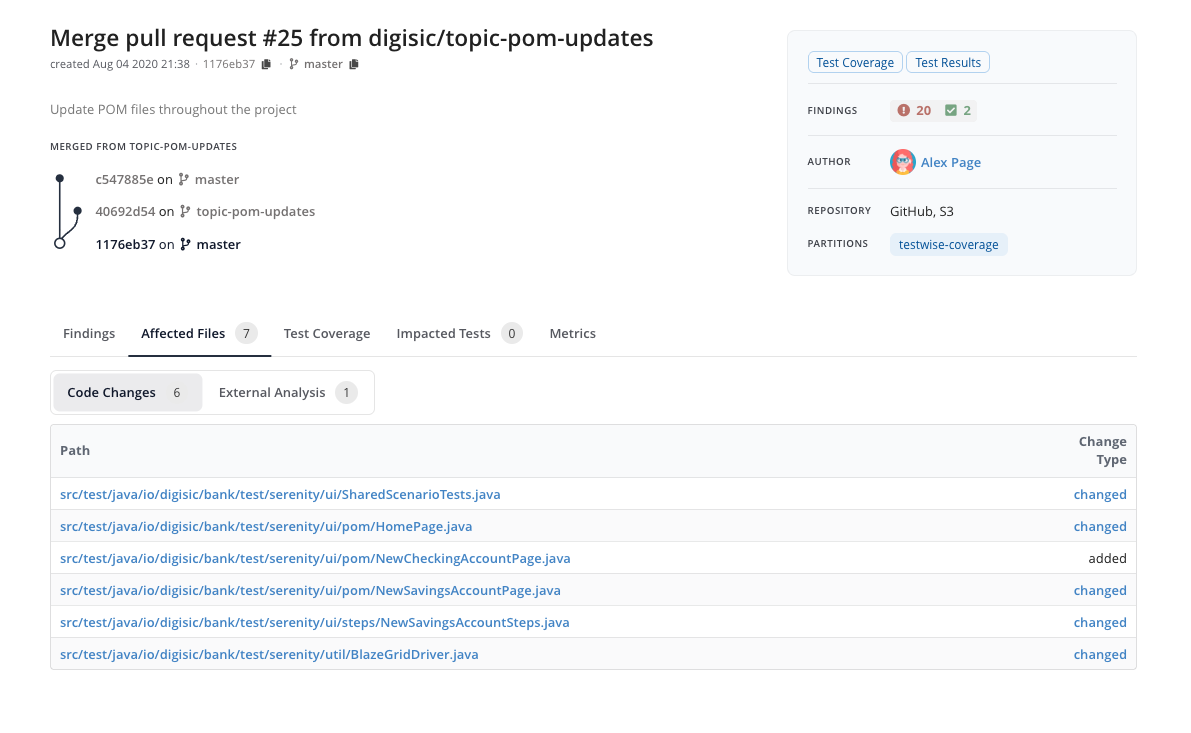
The Commit Details view in the Activity perspective has been redesigned with a tab-based layout, a sidebar for summaries and metadata, and a repository graph detailing the commit's parent-child relationships.
Refreshed Architecture Canvas
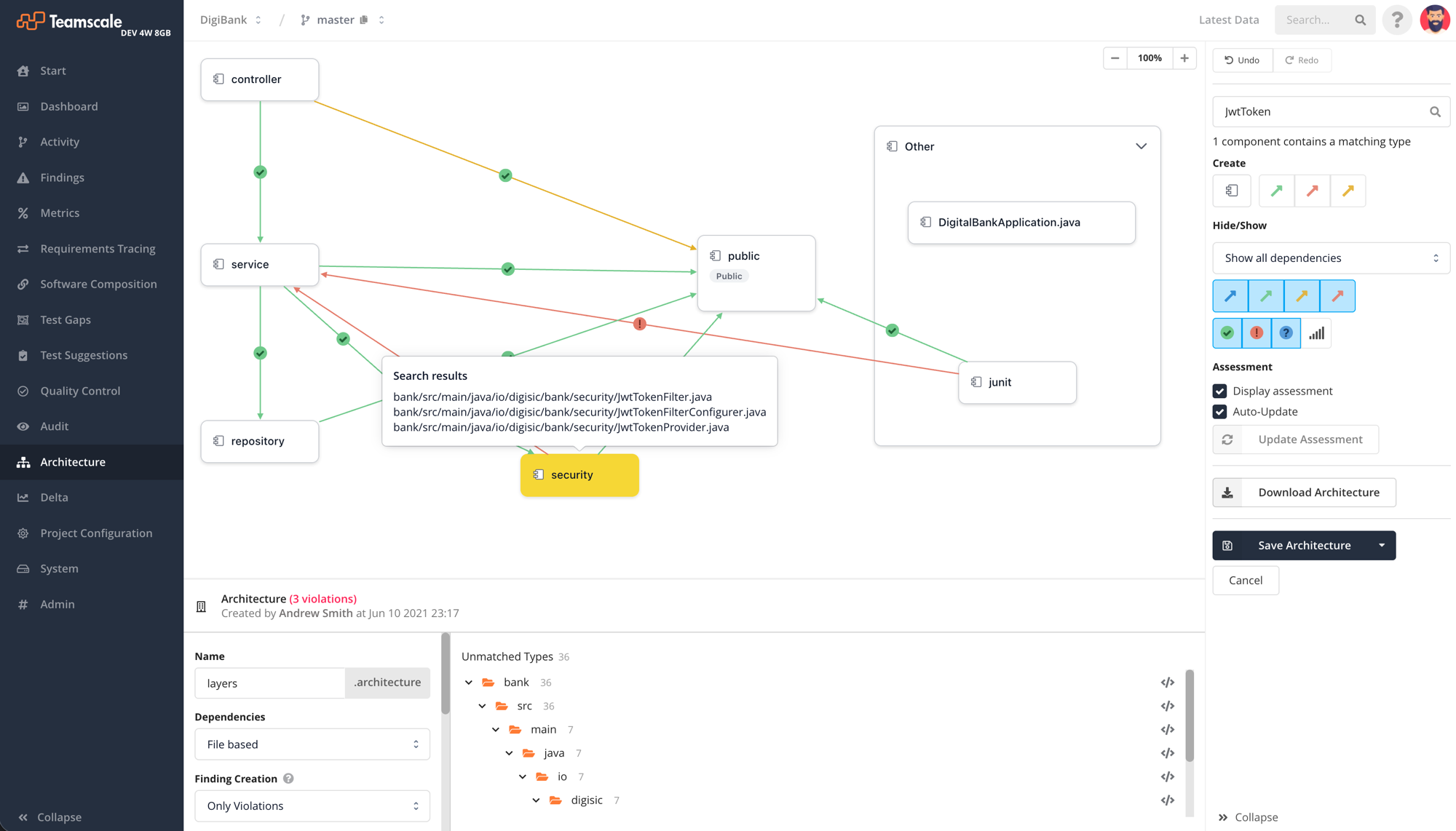
The architecture canvas in the Architecture perspective has been updated with a modern look.
Additional Improvements
- External Report Uploads: A new filter panel narrows the uploads of all partitions at once by partition, status, message, upload date, code date, branch, and commit. The commit filter accepts both Teamscale's
<branch>@<timestamp>format and a Git revision. - Delta: The metrics section now shows a change treemap and table for individual metrics, making it easy to see at a glance which files drove metric changes between two versions.
- Merge Requests: The merge request list has a new Agentic Review column showing when each merge request was last reviewed by an agentic review, so you can tell which merge requests still need one without opening them. The column is sortable, and selecting a date opens that merge request's Agentic Review tab. It is only shown for projects that have at least one Review Agent linked.
Test Intelligence
- Methods marked
teamscale:coverage ignore methodare excluded from coverage, in any parsed language and comment syntax. Excluded code no longer contributes coverable branches, including for[ExcludeFromCodeCoverage](C#) andistanbul ignore(JS/TS).
Software Composition Analysis
Upload of Vulnerability Reports
Teamscale now supports direct report uploads in industry-standard CycloneDX and SPDX formats via API. This allows teams to seamlessly integrate findings and dependency data from Software Composition Analysis (SCA) tools, such as Sonatype Nexus. Once uploaded, the results are fully integrated into Teamscale's Software Composition perspective, providing clear visibility over third-party dependencies and security risks.
For setup instructions, please refer to our documentation.
Additional Improvements
- CVE IDs in the Build Details view now link to their record at cve.org.
Analysis
- Improved support for Java 25: Module import declarations are now resolved correctly, improving analysis accuracy.
- Binary size analysis:
teamscale-buildnow extracts binary size and memory footprint metrics from ELF binaries built with gcc or clang, taking a linker map file anddwarfdumpoutput.sizeandmemorySizeare available as the predefined external non-code metrics Binary Size and Memory Footprint.
New Checks & Check Options
- The "Methods should not have too many parameters (Java)" check gained a Method annotation filter option that allows to ignore methods with specific annotations.
Plugins & Integrations
- Command-Line Clients:
teamscale-uploadis now also available as the Docker imagecqse/teamscale-uploadon Docker Hub for easy use in Docker-based CI pipelines. - IntelliJ Plugin: The findings view now labels files with IntelliJ's own icons, which distinguish a file by its contents (class, interface, enum).
ABAP
- Made ATC checks "Usage of APIs" and "Check for Enhancement Technologies" available, so violations of the "Clean Core" guidelines can be tracked in Teamscale.
- SAP Code Inspector findings are now grouped into a single check per Code Inspector test instead of one check per individual message. Existing analysis profiles are migrated automatically.
Administration & Operation
- Database Upgrade: We upgraded the bundled RocksDB implementation and significantly improved its default configuration for Teamscale's storage needs. For most installations this results in a much smaller database on disk, with lower memory usage and better performance (up to 25% faster project analysis completion times).
- External storage (S3): Teamscale now converts uploaded coverage and findings reports to a compacted format before storing them, which reduces the space they occupy and the amount of data transferred during analysis.
- Instance Comparison: The difference view now has navigation buttons, also bound to
Shiftplus the arrow keys, that step to the next difference in the same project or to the same difference in the next project. A dropdown selects what the navigation skips: unchanged groups, groups whose differences are all improvements, or groups within the accepted deviation. - Teamscale now provides dedicated Kubernetes probe endpoints —
/api/probes/startup,/api/probes/liveness, and/api/probes/readiness— that require no credentials. - Teamscale now accepts OAuth2 JWT access tokens (RFC 9068) issued by a trusted OpenID Connect provider as Bearer credentials for API authentication.