
Update Notices for Teamscale 2026.6
2026.6 Security: TLS certificates for LDAP connections are now validated
Teamscale will now reject expired or untrusted certificates. Self-signed certificates must be added to the JVM Trust Store to connect to an LDAP server via HTTPS.
2026.6 Cppcheck Premium: MISRA C edition moved from 2023 to 2025
The Cppcheck Premium integration now uses the MISRA C:2025 edition instead of MISRA C:2023. Accordingly, the check IDs of all MISRA C rules change from premium-misra-c-2023-* to premium-misra-c-2025-*. Existing findings and their tolerations are carried over across the rename, and analysis profiles are migrated automatically on upgrade.
The three changes below, however, drop the enablement setting of individual rules, no matter whether you had explicitly enabled or disabled them. Tolerations are not affected.
Action required: If you have customized any of the rules or checks listed below, review and re-apply your settings after upgrading.
- Rules absorbed into other rules are removed: MISRA C:2025 merged rule 11.7 ("A cast shall not be performed between pointer to object and a non-integer arithmetic type") into rule 11.4, and rule 17.6 ("The declaration of an array parameter shall not contain the
statickeyword between the[ ]") into rule 17.5. The merged rules no longer exist as standalone checks and are removed from migrated profiles. If you had enabled only 11.7 or 17.6, enable 11.4 or 17.5 respectively to keep the corresponding coverage. - Directive 5.2 (deadlocks) resets to its default: MISRA C:2025 reports thread data races (Dir 5.1) and deadlocks (Dir 5.2) under two distinct directives, while the previous mapping in Teamscale covered both under Dir 5.1. The migration preserves your setting for Dir 5.1, whereas Dir 5.2 takes its default, which is off. If you rely on deadlock detection, enable Dir 5.2 manually.
- Checks removed by the Cppcheck update: The open-source check
iterators2("Same iterator is used with different containers (2)") was dropped in Cppcheck 2.21.0 and is removed from migrated profiles. It no longer produces findings and cannot be re-enabled, and there is no replacement.
2026.6 Removed Teamscale Jira Gadget
The Teamscale Jira Gadget, which allowed showing a Teamscale dashboard within a Jira dashboard, has been removed with version 2026.6.
2026.6 Deprecated Test Gap Overview widget
We are deprecating the Test Gap Overview widget. Its two main functions are now covered better by other widgets:
- List of partitions and their latest upload commit: View this information via the Included Coverage Uploads button on each Test Gap treemap widget, which opens a filterable dialog of all uploads considered in the treemap. If this is your only use case for the widget, you can simply delete it from your dashboards.
- Test Gap percentage as a big number: The Test Gap pie chart widget introduced in Teamscale 2026.5 shows the same number in an easier to read and visually more pleasing way. Replace the overview widget with a Test Gap pie chart widget.
Timeline:
- Starting with 2026.6, the widget shows a banner informing users about the deprecation.
- Six months after this release, the widget will no longer show its content, only its banner.
- Three months after that, the widget will be removed completely from all dashboards.
2026.4 Security: Teamscale now validates the OpenId Connect tokens using the identity provider's JSON Web Key Set (JWKS)
Action Required: Manual Configuration for OpenID Connect
To enable token signature validation, admins must manually provide the JWKS URL from their Identity Provider. Without this step, the new security validation will not be active.
Steps to Update:
- Go to Admin > Settings > Authentication
- Edit your OpenID Connect configuration
- Add your Identity Provider's JWKS URL and save
2026.4 Security: External Content dashboard widget sandboxed by default
The content rendered by the External Content dashboard widget now has sandbox="" set by default. This blocks scripts, popups, downloads, top-level navigation, form submission and same-origin access from within the embedded page. The change addresses a security risk where a malicious embedded site could redirect users (phishing), execute JavaScript (drive-by exploits) or trigger malicious downloads from within Teamscale.
As a consequence, embeds that rely on JavaScript (e.g. dashboards from other tools) will no longer render. If you need such embeds, an administrator can opt back in by enabling Allow dynamic content in External Content Widget under Admin > Settings > Server Settings > Dashboards.
Security note: enabling this option allows embedded pages to execute arbitrary JavaScript and access their own origin. Only enable it if all URLs configured in External Content widgets across all dashboards are trusted.
2026.4 Renamed Java profiler Docker image to cqse/teamscale-java-profiler
Teamscale's Java profiler was thus far published under the name cqse/teamscale-jacoco-agent. To ensure consistent and clear naming of our profilers, we are renaming it to cqse/teamscale-java-profiler. This brings it in line with the naming for our .NET and JavaScript profilers. We will continue to publish updates for the Java profiler under both names until the end of September 2026. After that, updates will only be published under the new name.
Thus, we advise you to change the name of the Docker image you use to cqse/teamscale-java-profiler. The versioning scheme remains the same.
2026.4 Oldest supported IntelliJ raised to 2023.3
The oldest supported version for the IntelliJ plug-in was raised to version 2023.3.
2026.4 Default log4j2.yaml has changed
The default log4j2.yaml shipped under config/log4j2.yaml has changed in 2026.4. If you have customized this file in your installation, please review the new default and merge in your changes manually — otherwise the new defaults will be lost on upgrade.
You can download the new default configuration here:
2026.3 Removed PDB processing and related services
The ability to upload PDBs and raw .NET trace files for tracking line coverage has been removed with version 2026.3.
2026.2 Removed AllowAll Authenticator
For security reasons, the AllowAll Authenticator has been removed with version 2026.2.
2026.1 Java 25 Required (Teamscale server application)
Starting with version 2026.1, the Teamscale server will require Java 25 to be executed.
Action required: In case you are not using a Docker-based deployment, please make sure to update the JRE used for executing Teamscale to Java 25.
2025.9 Removed Base Configuration for Threshold Configurations
The ability to define a Base Configuration for a Threshold Configuration has been removed with version 2025.9.
2025.9 Removed the movetolastcommit query parameter in all 'External Analysis' API endpoints
The movetolastcommit parameter was no longer needed and has been removed with version 2025.9 to avoid confusion for all the 'External Analysis' API endpoints:
- Create a Session:
POST /api/projects/{project}/external-analysis/session - Upload External Report(s):
POST /api/projects/{project}/external-analysis/session/{sessionId}/report - Upload External Analysis Data:
POST /api/projects/{project}/external-analysis/session/{sessionId}/external-analysis-import-infos - Upload External Findings:
POST /api/projects/{project}/external-analysis/session/{sessionId}/external-findings - Upload External Metrics:
POST /api/projects/{project}/external-analysis/session/{sessionId}/external-metrics - Upload Non-code Metrics:
POST /api/projects/{project}/external-analysis/session/{sessionId}/non-code-metrics
2025.7 Removed SPCop Upload Format
The SPCop upload format has been completely removed with version 2025.7.
2025.5 Removed Legacy API: Pre-Commit 2 REST API
The pre-commit 2 REST API, unused by Teamscale's own IDE plug-ins since version 9.3, has been completely removed with version 2025.5.
Action required: If you are using the API to make pre-commit requests, either update to the new /api/projects/{project}/pre-commit3 REST API or, preferably, use the command-line client for developers (teamscale-dev) to perform your requests.
Re-Analysis when Upgrading
- When updating from 2026.6.x, drop-in.
- When updating from 2026.5.x or earlier, a full re-analysis via backup is required.
What's New for Teamscale 2026.6
AI Features
Starting with this release, Teamscale leverages the power of large language models (LLMs) for code quality tasks — reviewing merge requests, summarizing unfamiliar code, and suggesting finding resolutions. Administrators connect Teamscale to one or more model providers and define routing rules that select a model for each AI task, so a single setup enables every AI feature below. See AI Model Providers and Using AI Assistance for the full documentation.
Agentic Merge Request Reviews
Teamscale can now review merge requests using review agents: AI agents that inspect the changes, use tools such as code search, dependency lookup, commit history, and existing findings to explore the code base, and produce review comments. Several agents with different focus areas, for example coding guidelines or test quality, can review the same merge request. Teamscale ships with a set of preconfigured review agents that can be used as-is, adjusted, or used as templates for your own.
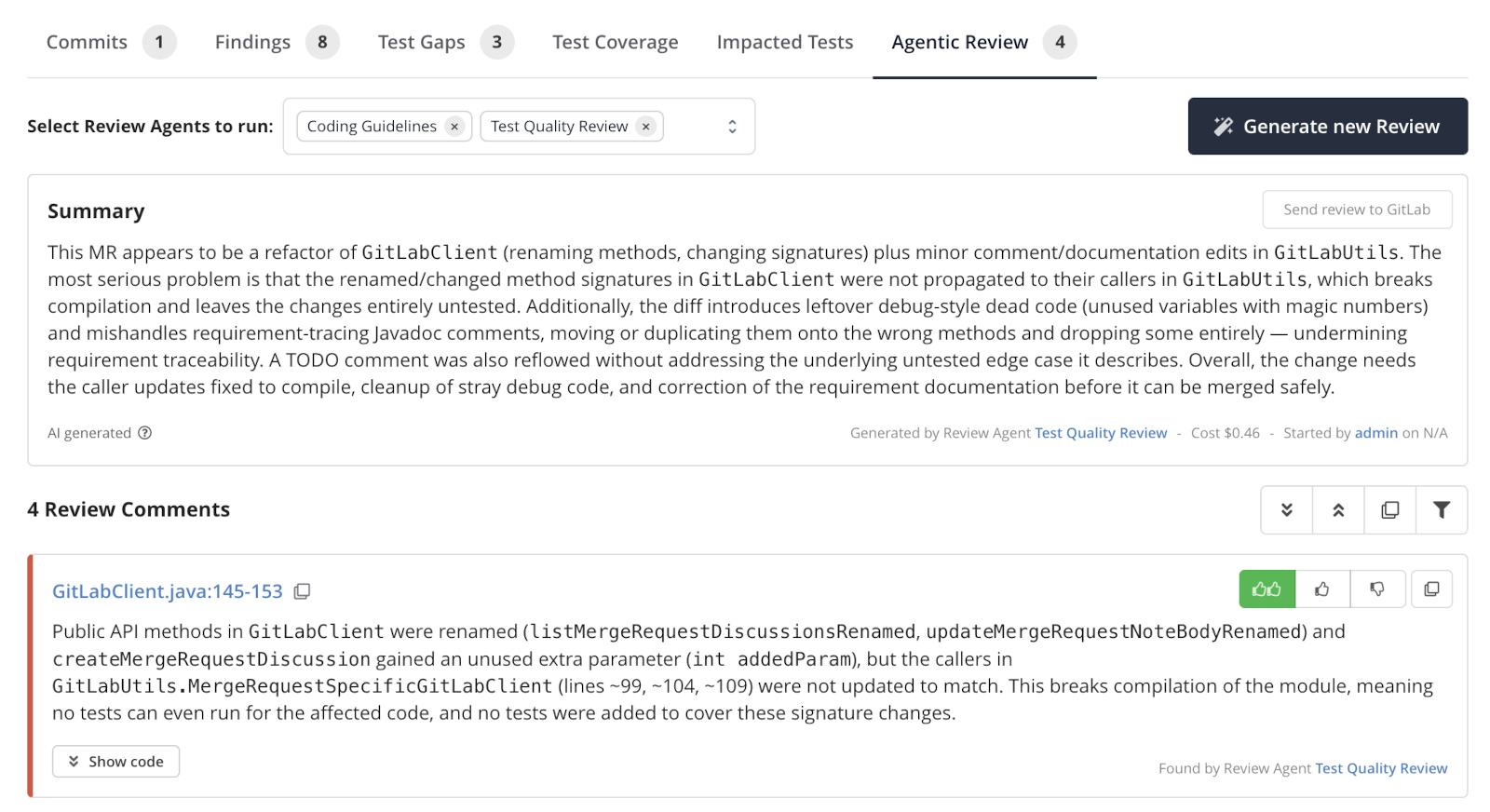
Reviews can be started from the merge request's Agentic Review tab in the Activity perspective, or directly from GitLab by posting /teamscale review as a comment on the merge request. Teamscale then posts the review comments back as inline discussions. Each review comment can be rated Very helpful, Helpful, or Not helpful / false positive, which helps tune your review agents over time via the Agentic Review Statistics chart.
See How to Review Merge Requests with AI Agents for the full walkthrough, including how to manage and link review agents to a project.
AI Assistance in the Web UI
Two smaller AI-assisted actions are now available directly where you already work:
- Code summaries: Choose Summarize from the AI Actions menu on a code file in the Metrics perspective to get a natural-language summary of an unfamiliar file, generated with the help of related files and dependency lookups.
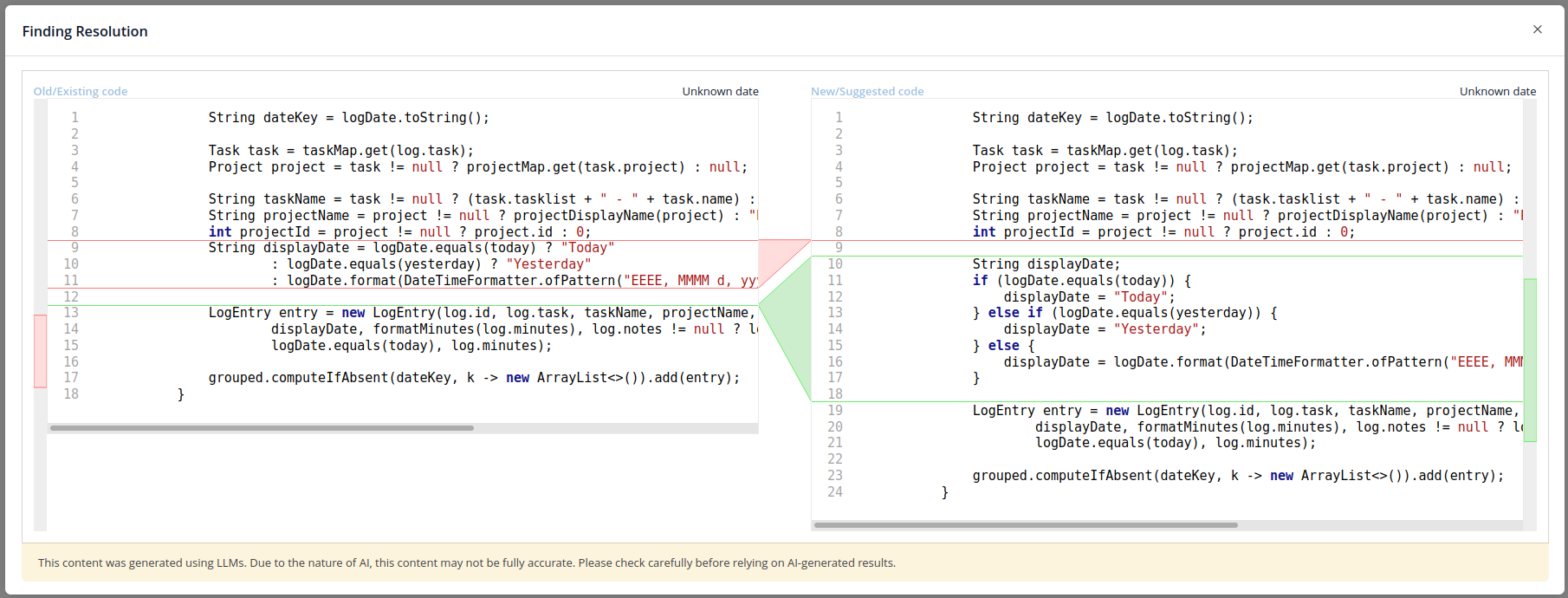
- AI-suggested finding resolutions: Choose Suggest resolution from the AI Actions menu on a finding in the Findings perspective to get a concrete code change that resolves it, shown as a side-by-side comparison. Teamscale never changes your code automatically — you review the suggestion and apply it manually.
AI Model Providers and Routing
The new AI Model Providers settings, located in the Admin perspective under Settings, connect Teamscale to OpenAI, Anthropic, Gemini, or a self-hosted Ollama server. Services that implement the OpenAI API, such as OpenRouter or Microsoft Foundry, are connected through the OpenAI provider as well. For full control over your data, a self-hosted provider such as Ollama or any OpenAI-compatible local endpoint can be used instead of a cloud provider.
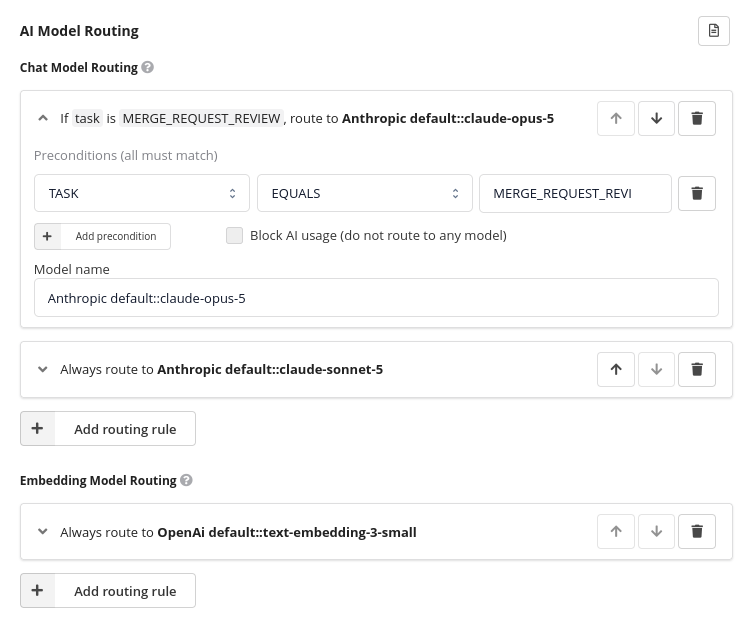
AI model routing rules then decide which model handles which request, based on the user, group, project, task, or task complexity. This allows, for example, routing merge request reviews to a strong model while using a cheaper model for code summaries, or restricting AI usage to specific projects. A rule can also explicitly block AI usage instead of selecting a model.
Every model interaction is recorded for administrators in the AI Log (full prompts and responses, useful for debugging) and aggregated in the AI Usage Information view (token counts and estimated cost over time, grouped by user, project, model, or task), both in the System perspective. Estimated costs require configuring AI Pricing, a table of per-model, per-token prices used only for cost transparency, not for enforcing a budget or quota.
Test Intelligence
AI Test Clustering: Smoke Test Suites Without Coverage Data
The Change-Independent Test Suggestions view has been reworked and now helps you assemble a smoke test suite from your existing tests, independent of any code change.
The new Content-Based Suggestions tab Beta uses an AI embedding model to compare test implementations and ranks the most dissimilar tests first, so that even a short prefix of the list exercises a wide range of functionality. Because it works on the test code itself, this ranking needs no testwise coverage and can be used out of the box.
Where testwise coverage is available, the Coverage-Based Suggestions tab complements this with a Pareto ranking that maximizes code coverage for a given time budget, including a coverage treemap, a Pareto curve, and a budget slider.
On both tabs, you select the candidate tests with a test query, limit the result by number of tests or by test budget, and export your selection as CSV. See the Test Suggestions perspective for details.
While our coverage-based selection ensures that the resulting test suite maximizes the code coverage for a given time budget, content-based suggestions compile the conceptually most diverse test suite for a given budget.
Test Suggestions for Unsupported Test Frameworks
Teamscale's Test Suggestions now extend to test frameworks that Teamscale does not parse natively, including Robot Framework, Cucumber .feature files, and Tosca JSON exports. By configuring a set of file patterns (for example **/*.robot) in the Generic test implementation patterns analysis profile option, you can instruct Teamscale to use each matching file as a test implementation. Because this requires no custom extraction logic or dedicated parser support, teams working with non-standard or in-house test frameworks can now benefit from change-based test suggestions as well.
Quality Control
- Report Editor: Pressing
Nnow opens the Add Slide popup, so you can keep adding slides without reaching for the mouse. Like all shortcuts, it is listed in the keyboard shortcut help that opens with?. - The System Quality Overview slide now supports the Metric values and Trend delta options for slides that show their metrics in two columns. The slide content is scaled down automatically to make room for the additional columns.
Web Interface
Redesigned Project Edit View
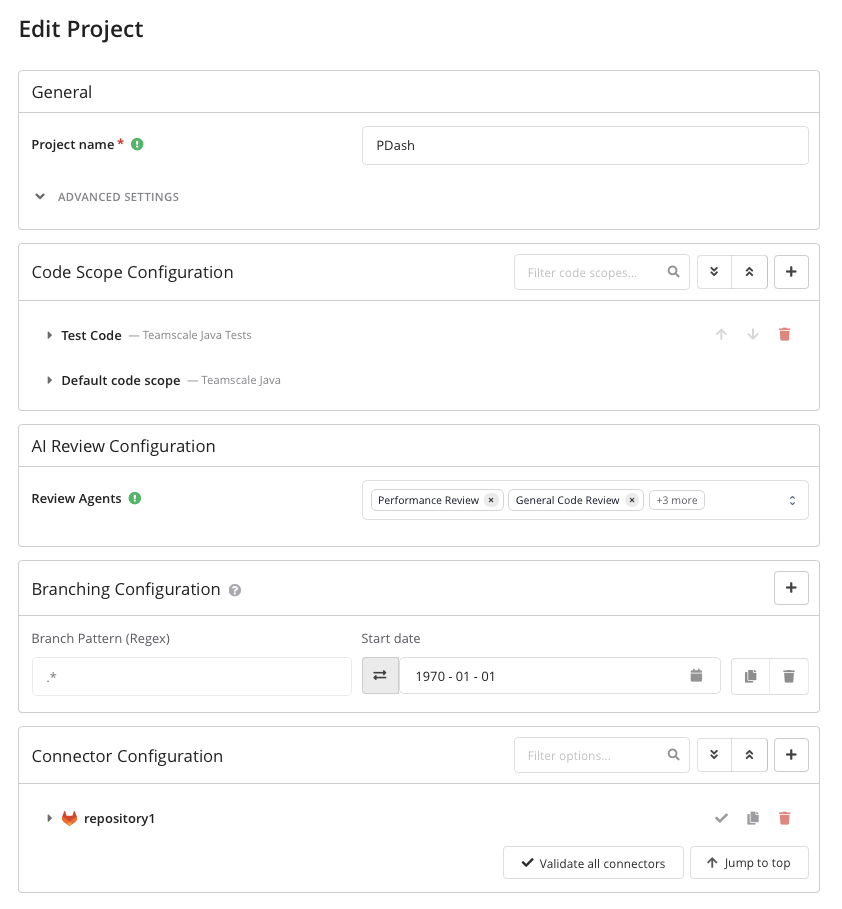
The Edit Project view has a fresh look and feel. Code scopes and connectors are now edited inline as collapsible cards, so you can expand several entries at once, for example to compare their patterns side by side. Both sections also gained a filter box to search across entries, expand/collapse-all controls, and a Validate all connectors button that surfaces per-connector validation results directly in the list.
- Architecture Editor: Expanding a folder with a single subfolder in the Unmatched Types panel now expands the entire chain of single subfolders at once, saving a click per level in deeply nested directory structures.
Merge Requests
Redesigned Merge Request Details View
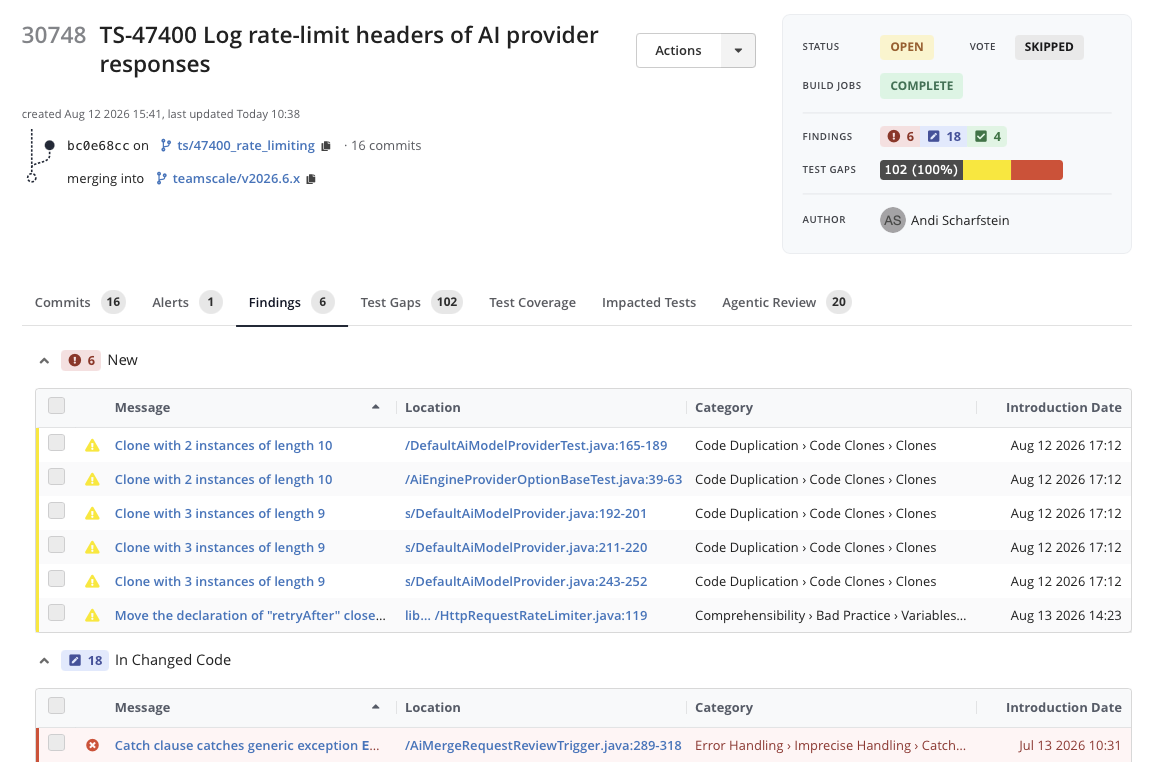
The Merge Request details view now uses a tab-based layout instead of expandable sections, matching the design of the issue details view. Each tab carries its headline result as a badge — the number of findings, the test gap percentage, the coverage of changes — so you see the outcome of every analysis at a glance and reach the details with a single click instead of scrolling through the whole page.
The list of relevant build jobs no longer occupies the top of the page. Instead, a build status badge shows whether Teamscale is still waiting for builds to finish, with the details available in a popover.
Analysis
- Simulink: Annotation connection lines, which link an annotation to the block it describes, are now shown in Teamscale's block diagram view.
- Cppcheck has been updated to version 2.21.0 for the open-source edition and 26.6.0 for the premium edition, adding new checks and removing checks that are no longer available.
New Checks & Check Options
- C/C++: New check that flags macro definitions whose complex expressions are not enclosed in parentheses (e.g.
#define EXPR 1 + 2instead of#define EXPR (1 + 2)), which can produce surprising results when the macro is expanded inside a larger expression. - C/C++: The "Data Structure Alignment" finding now lists the struct members that should be reordered directly in the finding message, making it actionable without opening Teamscale.
- The "Avoid using certain text snippets" check now lets you specify a preferred alternative for each snippet by using the
->operator in the Text snippets to avoid option, for exampleprintStackTrace -> logger.error. The finding then names the replacement directly ("Avoid usingprintStackTrace. Use insteadlogger.error."), so developers no longer have to consult the check description to learn what to use instead.
Documentation
- The Teamscale documentation now also ships in an LLM-readable format following the llms.txt standard. Next to
llms.txtandllms-full.txt, every page is available as plain Markdown by appending.mdto its URL, so AI coding agents and chat assistants can consume the documentation directly.
Administration & Operation
- Teamscale now supports technical users that have API access but cannot log in to the Web UI. If you have technical user accounts configured, we recommend switching them to the new Access key only authenticator (Admin > Users). This way, they can no longer log in via the Web UI and are excluded from the license-relevant usage statistics.
- Teamscale can now synchronize finding IDs with another Teamscale instance, keeping IDs stable and avoiding the loss of tolerated findings after an instance update. Configure this under Remote Findings Tracking in Admin > Settings > Server Settings, providing the other instance's URL when importing a backup. Both instances must be running version 2026.5 or newer.