
Update Notices for Teamscale 2026.4
2026.4 Security: Teamscale now validates the OpenId Connect tokens using the identity provider's JSON Web Key Set (JWKS)
Action Required: Manual Configuration for OpenID Connect
To enable token signature validation, admins must manually provide the JWKS URL from their Identity Provider. Without this step, the new security validation will not be active.
Steps to Update:
- Go to Admin > Settings > Authentication
- Edit your OpenID Connect configuration
- Add your Identity Provider's JWKS URL and save
2026.4 Security: External Content dashboard widget sandboxed by default
The content rendered by the External Content dashboard widget now has sandbox="" set by default. This blocks scripts, popups, downloads, top-level navigation, form submission and same-origin access from within the embedded page. The change addresses a security risk where a malicious embedded site could redirect users (phishing), execute JavaScript (drive-by exploits) or trigger malicious downloads from within Teamscale.
As a consequence, embeds that rely on JavaScript (e.g. dashboards from other tools) will no longer render. If you need such embeds, an administrator can opt back in by enabling Allow dynamic content in External Content Widget under Admin > Settings > Server Settings > Dashboards.
Security note: enabling this option allows embedded pages to execute arbitrary JavaScript and access their own origin. Only enable it if all URLs configured in External Content widgets across all dashboards are trusted.
2026.4 Renamed Java profiler Docker image to cqse/teamscale-java-profiler
Teamscale's Java profiler was thus far published under the name cqse/teamscale-jacoco-agent. To ensure consistent and clear naming of our profilers, we are renaming it to cqse/teamscale-java-profiler. This brings it in line with the naming for our .NET and JavaScript profilers. We will continue to publish updates for the Java profiler under both names until the end of September 2026. After that, updates will only be published under the new name.
Thus, we advise you to change the name of the Docker image you use to cqse/teamscale-java-profiler. The versioning scheme remains the same.
2026.4 Oldest supported IntelliJ version will be raised to 2023.3 with 2026.5
Starting with Teamscale version 2026.5, the oldest supported version for the IntelliJ plug-in will be raised to version 2023.3.
2026.4Deprecated Teamscale Jira Gadget
The Teamscale Jira Gadget is now deprecated and will be removed in version 2026.6.
2026.4 Default log4j2.yaml has changed
The default log4j2.yaml shipped under config/log4j2.yaml has changed in 2026.4. If you have customized this file in your installation, please review the new default and merge in your changes manually — otherwise the new defaults will be lost on upgrade.
You can download the new default configuration here:
2026.3 Removed PDB processing and related services
The ability to upload PDBs and raw .NET trace files for tracking line coverage has been removed with version 2026.3.
2026.2 Removed AllowAll Authenticator
For security reasons, the AllowAll Authenticator has been removed with version 2026.2.
2026.1 Java 25 Required (Teamscale server application)
Starting with version 2026.1, the Teamscale server will require Java 25 to be executed.
Action required: In case you are not using a Docker-based deployment, please make sure to update the JRE used for executing Teamscale to Java 25.
2025.9 Removed Base Configuration for Threshold Configurations
The ability to define a Base Configuration for a Threshold Configuration has been removed with version 2025.9.
2025.9 Removed the movetolastcommit query parameter in all 'External Analysis' API endpoints
The movetolastcommit parameter was no longer needed and has been removed with version 2025.9 to avoid confusion for all the 'External Analysis' API endpoints:
- Create a Session:
POST /api/projects/{project}/external-analysis/session - Upload External Report(s):
POST /api/projects/{project}/external-analysis/session/{sessionId}/report - Upload External Analysis Data:
POST /api/projects/{project}/external-analysis/session/{sessionId}/external-analysis-import-infos - Upload External Findings:
POST /api/projects/{project}/external-analysis/session/{sessionId}/external-findings - Upload External Metrics:
POST /api/projects/{project}/external-analysis/session/{sessionId}/external-metrics - Upload Non-code Metrics:
POST /api/projects/{project}/external-analysis/session/{sessionId}/non-code-metrics
2025.7 Removed SPCop Upload Format
The SPCop upload format has been completely removed with version 2025.7.
2025.5 Removed Legacy API: Pre-Commit 2 REST API
The pre-commit 2 REST API, unused by Teamscale's own IDE plug-ins since version 9.3, has been completely removed with version 2025.5.
Action required: If you are using the API to make pre-commit requests, either update to the new /api/projects/{project}/pre-commit3 REST API or, preferably, use the command-line client for developers (teamscale-dev) to perform your requests.
2025.4 Removed feature: Timespan-based threshold configurations
The Timespan-based threshold configurations section of the "Threshold Configuration List" project option has been removed, as this functionality caused inconsistencies when combined with certain other features and was rarely used. This change does not affect the project's default threshold configuration.
Re-Analysis when Upgrading
- When updating from 2026.4.x, drop-in.
- When updating from 2026.3.x or earlier, a full re-analysis via backup is required.
What's New for Teamscale 2026.4
Test Intelligence
Similarity Scoring: Smarter Test Suggestions
Dear Teamscale, I changed this code — which tests should I run now?
Introducing Similarity Scoring, a new feature that suggests the most helpful tests to run for the code changes you have made — whether in a pull request, for a new feature, or for an entire release. Shift left, reduce test runtime, and cut costs without compromising on quality. In our case studies we were able to uncover up to 90% of bugs in just 4% of the usual test runtime. Setup is straightforward: connect Teamscale to your version control system and import your test code — no coverage data required.
Select which risks you want to cover with tests: recent changes on a branch or changes made in certain issue tracker tickets you implemented. The risk treemap shows which methods in your system were affected. 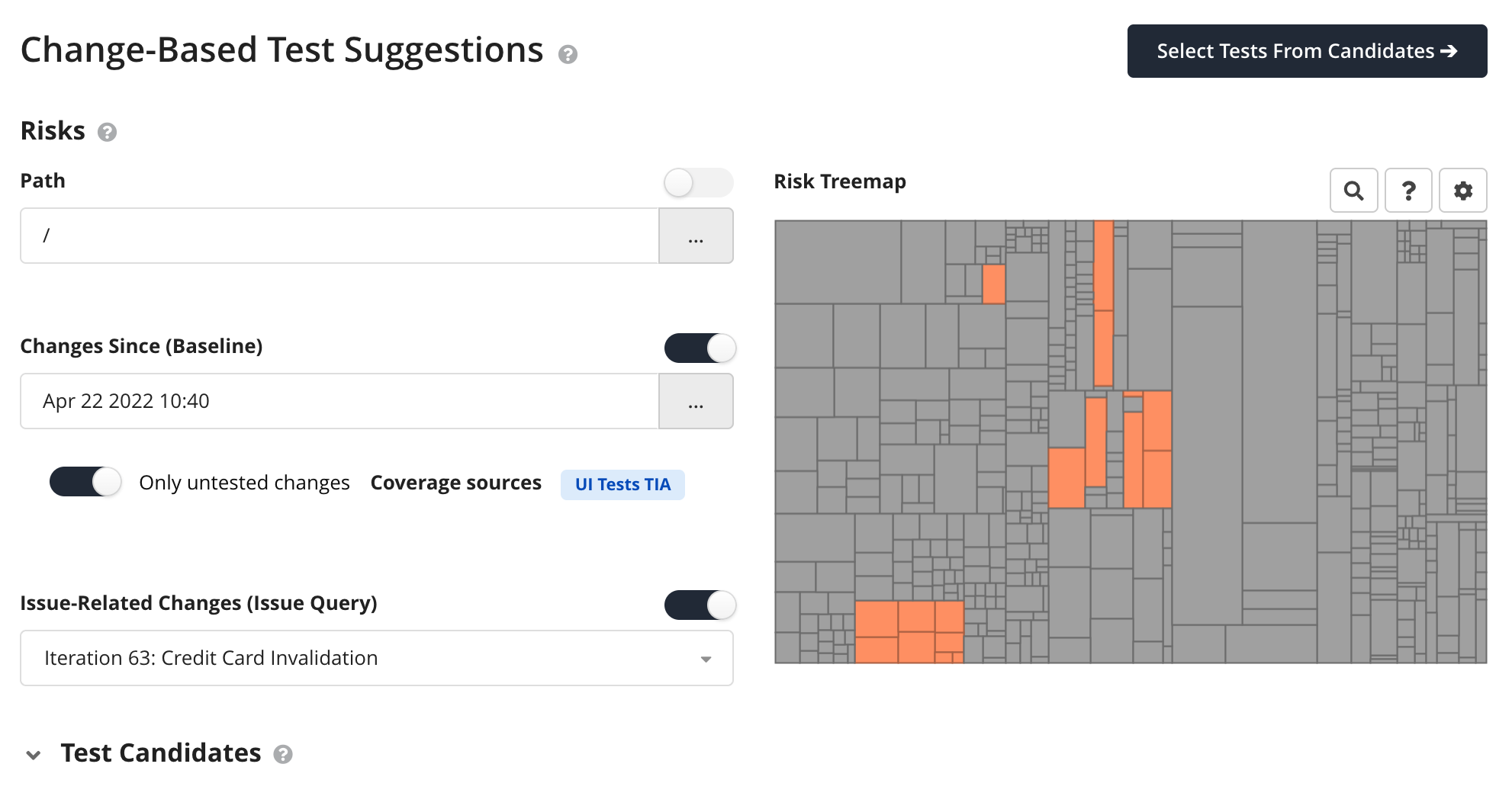
Then Teamscale suggests the tests that have the highest likelihood to find bugs for those changes. 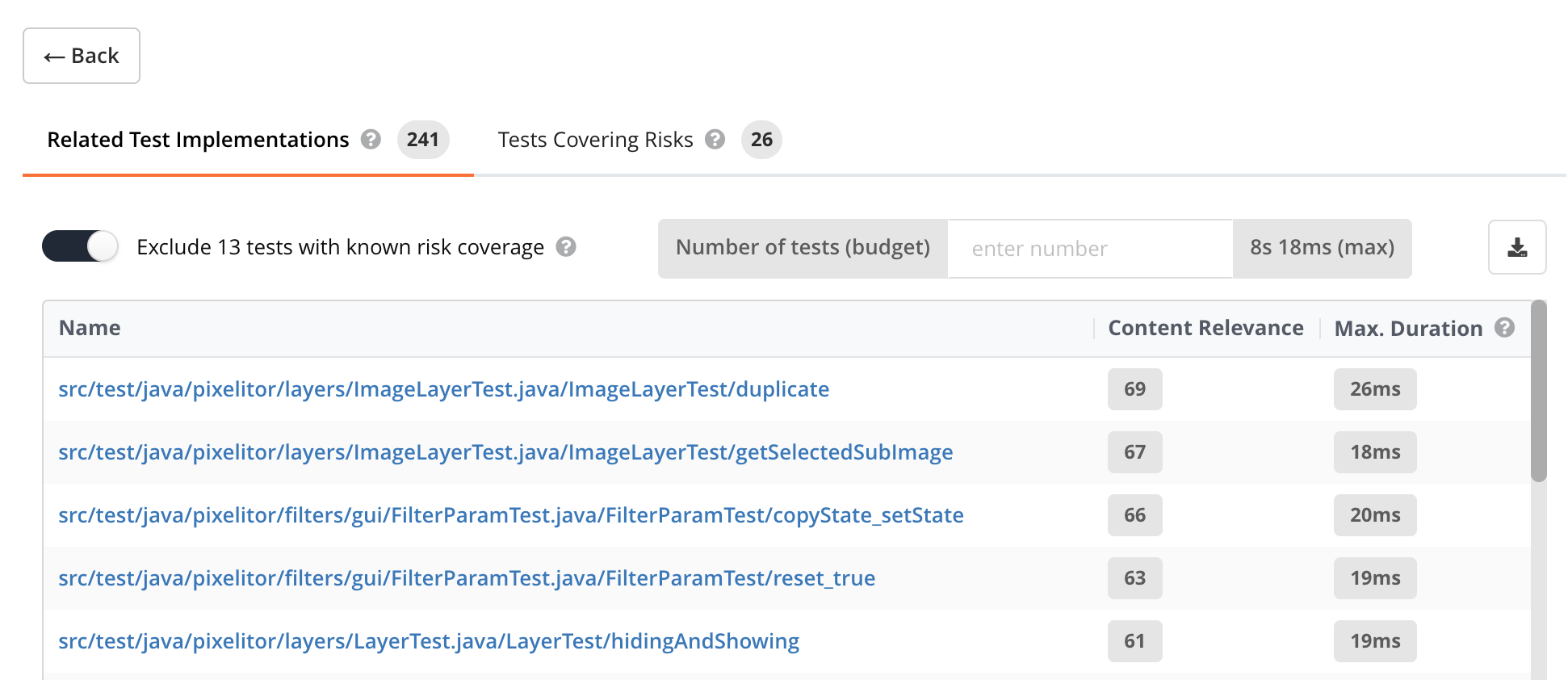
Want to learn more? Watch our demo or check our cheat sheet.
Coverage and Test Gaps
- Teamscale can now prioritize Test Gaps based on, among others, the complexity of the change and how problematic the changed code is. This lets you work on the most critical Test Gaps first. This data is available as a CSV download.
- Added support for importing LLVM coverage reports in version
3.0.0/3.0.1, as produced by modern Clang/LLVM toolchains. - Teamscale now supports importing code coverage in the SonarQube generic coverage format, making it easier to migrate from SonarQube to Teamscale without changing your coverage pipeline.
teamscale-buildcan now produce method-accurate testwise coverage from Bullseye coverage reports via the new--method-accurateoption. This significantly speeds up analysis and reduces report size for C/C++ projects using Test Impact Analysis.
Quality Control
Recurring Retrospectives
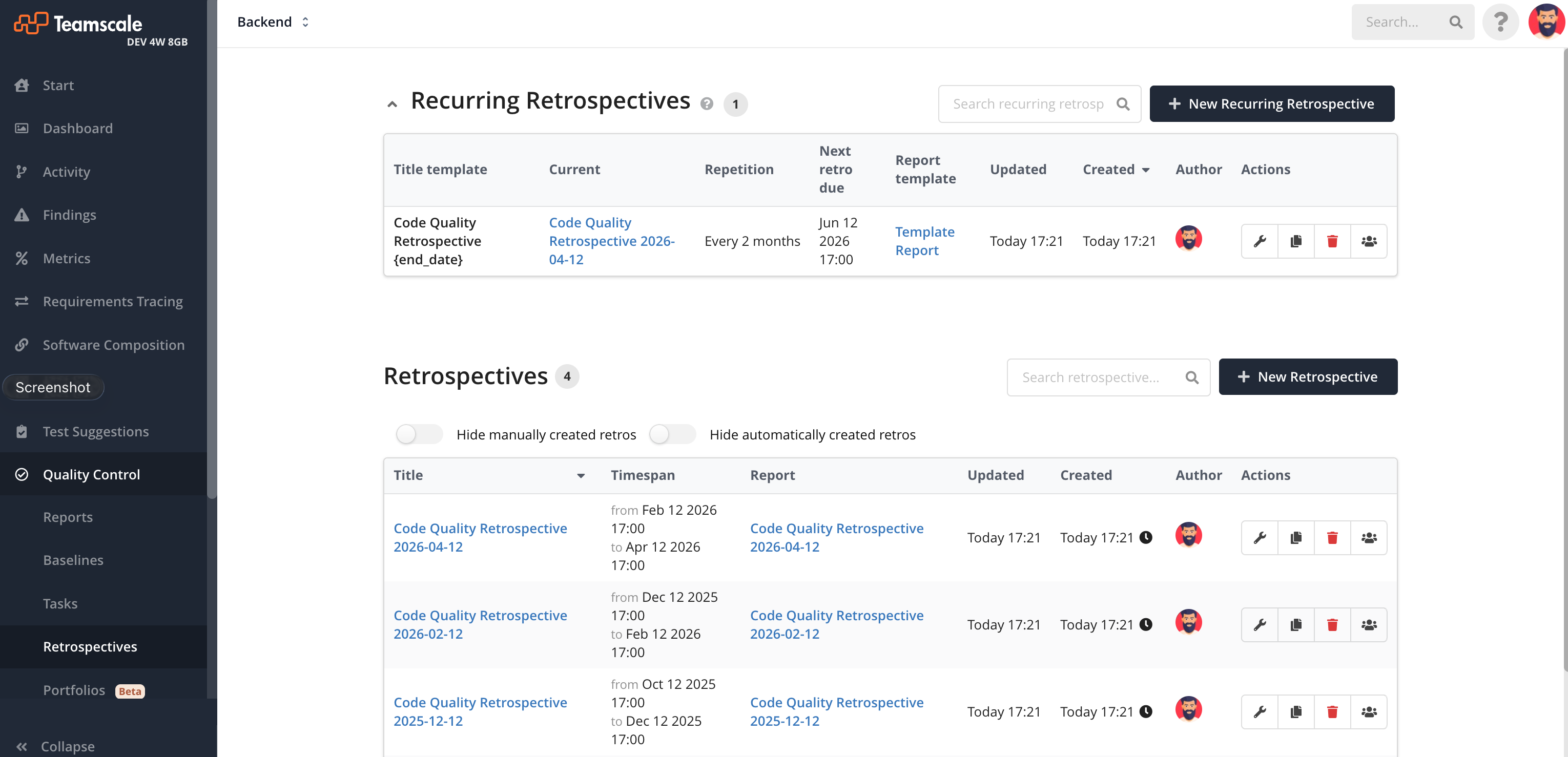
Teamscale now supports the automatic generation of retrospectives at user-defined intervals, allowing you to automate everything from weekly team syncs to quarterly compliance reports. Simply set your desired time interval, and Teamscale will automatically generate the retrospective. Furthermore, reports will be created based on a provided template. This helps you maintain consistent quality cycles and streamline your reporting without the manual overhead.
Reports
- The System Quality Overview slide now shows hover tooltips that explain what each indicator means — whether it reflects the overall state or a trend, and why it is rated as good, neutral, or bad. This makes it easier to interpret assessment metrics and quality indicators without consulting the documentation.
Web Interface
Command Palette for Quick Navigation
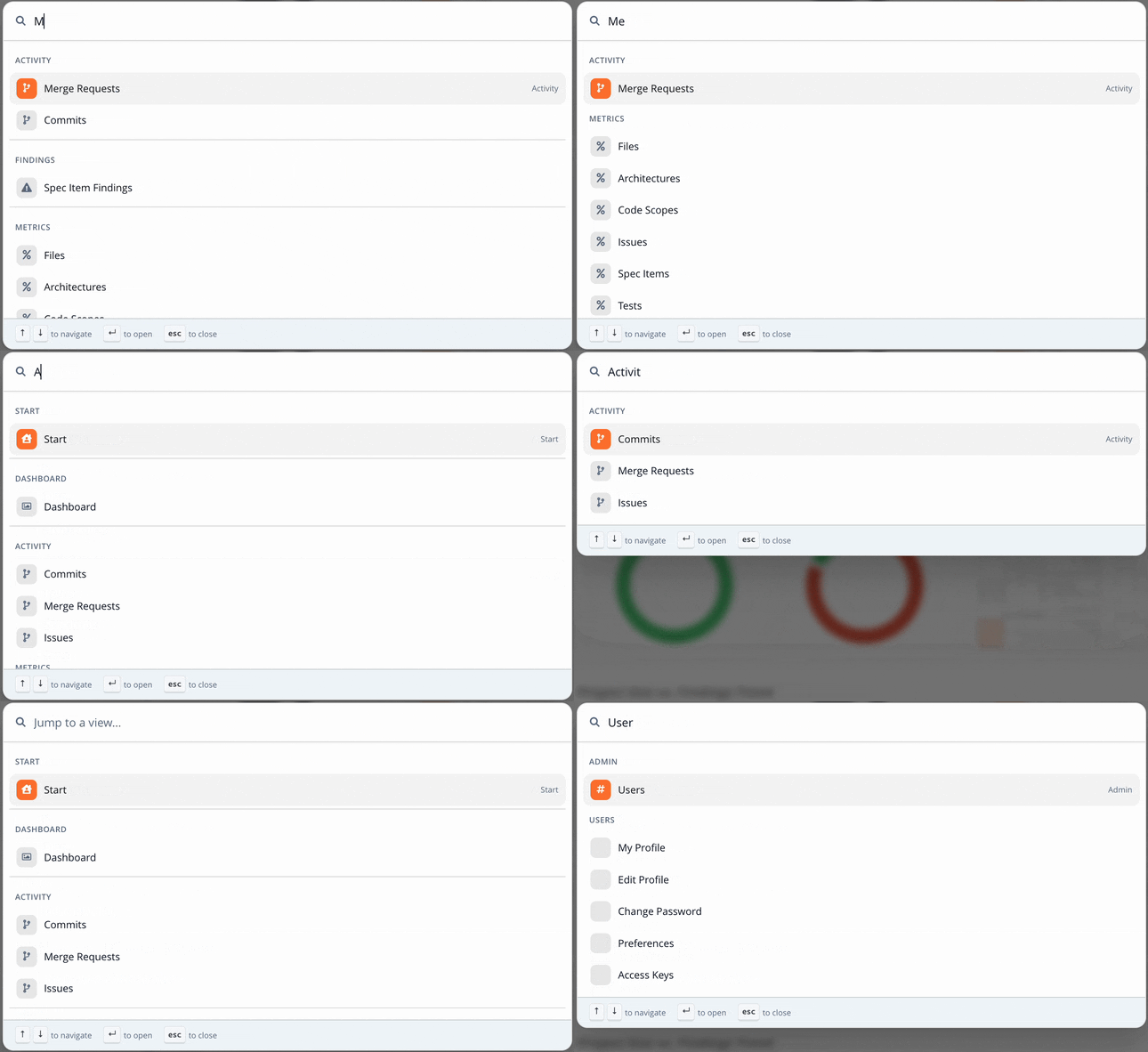
This release comes with a new Command Palette accessible via Ctrl/Cmd+K. It lets you quickly navigate to the different views and perspectives in Teamscale using only the keyboard.
User Experience Improvements
- Check Editor: The Analysis Group and Check lists are now resizable in width, allowing you to better utilize horizontal screen real estate.
- The Code Compare visualization (as used for comparing file revisions or code clones) now supports macro expansion for programming languages with macros.
- The Architecture list view now periodically refreshes to instantly show changes in the architectures' analysis statuses.
- Architecture Editor: The mapping editor for file-based architectures now offers a path selector for include and exclude patterns. Selecting a path from the project files and directories automatically generates a properly escaped regex, removing the need to type patterns by hand.
- The Change Treemap in the Delta perspective now uses a color-blind-friendly color palette, making it accessible to users with color vision impairment.
Merge Requests
Consolidated Review Comments for Findings
Teamscale now consolidates multiple finding comments into a single review comment on merge requests, reducing noise and overhead. When several findings occur on the same line, they are grouped into one comment listing all affected findings. Similarly, findings of the same type on contiguous lines are merged into a single comment. This applies to all supported code collaboration platforms.
Separate Toggles for Metric and Critical Change Badges
The connector configuration now provides separate options to control whether metric badges and critical change badges are posted to merge requests. This allows you to configure which metrics and critical changes to track without automatically exposing badges to users in the code collaboration platform.
New Checks & Check Options
- Java: A new check detects unclosed resources, such as streams or readers, that are opened but never closed via
try-with-resourcesor afinallyblock. This helps prevent resource leaks that can lead to out-of-memory errors in production. - The Long Lines check now supports a regex pattern to exclude specific lines. This is useful for lines that are unavoidably long, such as Java
importorpackagestatements. - The ABAP taint analysis checks have been renamed to clearly describe the security issue they detect (e.g., "Potential OS Command Injection" instead of "Taint Propagation - OS_COMMAND_"), making it easier to understand findings at a glance.
- The Hard-Coded Password check now has a new check option which allows to additionally detect hard-coded credentials in URLs.
Analysis: Integrated Tools
- Updated the integrated SwiftLint to version 0.63.2, including bug fixes, 5 new checks, and several new check options.
- Clang-Tidy configuration files can now be imported to create new or extend existing Teamscale analysis profiles.
Administration & Operation
- Teamscale's audit log is now enabled by default (previously a hidden feature) and writes events to
audit.log(configurable) by default. The audit log records key actions so administrators can review who did what, including sign-ins, password changes, user and group management, project creation or deletion, configuration changes, backups, and failed permission checks for sensitive operations. Each entry identifies the acting user so the log remains traceable for security and compliance reviews. - The SAP System Connections section under System > System Information now lists the most recent full sync for each configured SAP system connection, including currently running ones. This gives administrators visibility into long-running SAP background sync jobs.