
Update Notices for Teamscale 2026.3
2026.3 Removed PDB processing and related services
The ability to upload PDBs and raw .NET trace files for tracking line coverage has been removed with version 2026.3.
2026.2 Removed AllowAll Authenticator
For security reasons, the AllowAll Authenticator has been removed with version 2026.2.
2026.1 Java 25 Required (Teamscale server application)
Starting with version 2026.1, the Teamscale server will require Java 25 to be executed.
Action required: In case you are not using a Docker-based deployment, please make sure to update the JRE used for executing Teamscale to Java 25.
2025.9 Removed Base Configuration for Threshold Configurations
The ability to define a Base Configuration for a Threshold Configuration has been removed with version 2025.9.
2025.9 Removed the movetolastcommit query parameter in all 'External Analysis' API endpoints
The movetolastcommit parameter was no longer needed and has been removed with version 2025.9 to avoid confusion for all the 'External Analysis' API endpoints:
- Create a Session:
POST /api/projects/{project}/external-analysis/session - Upload External Report(s):
POST /api/projects/{project}/external-analysis/session/{sessionId}/report - Upload External Analysis Data:
POST /api/projects/{project}/external-analysis/session/{sessionId}/external-analysis-import-infos - Upload External Findings:
POST /api/projects/{project}/external-analysis/session/{sessionId}/external-findings - Upload External Metrics:
POST /api/projects/{project}/external-analysis/session/{sessionId}/external-metrics - Upload Non-code Metrics:
POST /api/projects/{project}/external-analysis/session/{sessionId}/non-code-metrics
2025.7 Removed SPCop Upload Format
The SPCop upload format has been completely removed with version 2025.7.
2025.5 Removed Legacy API: Pre-Commit 2 REST API
The pre-commit 2 REST API, unused by Teamscale's own IDE plug-ins since version 9.3, has been completely removed with version 2025.5.
Action required: If you are using the API to make pre-commit requests, either update to the new /api/projects/{project}/pre-commit3 REST API or, preferably, use the command-line client for developers (teamscale-dev) to perform your requests.
2025.4 Removed feature: Timespan-based threshold configurations
The Timespan-based threshold configurations section of the "Threshold Configuration List" project option has been removed, as this functionality caused inconsistencies when combined with certain other features and was rarely used. This change does not affect the project's default threshold configuration.
Re-Analysis when Upgrading
- When updating from 2026.3.x, drop-in.
- When updating from 2026.2.x or earlier, a full re-analysis via backup is required.
What's New for Teamscale 2026.3
Merge Requests
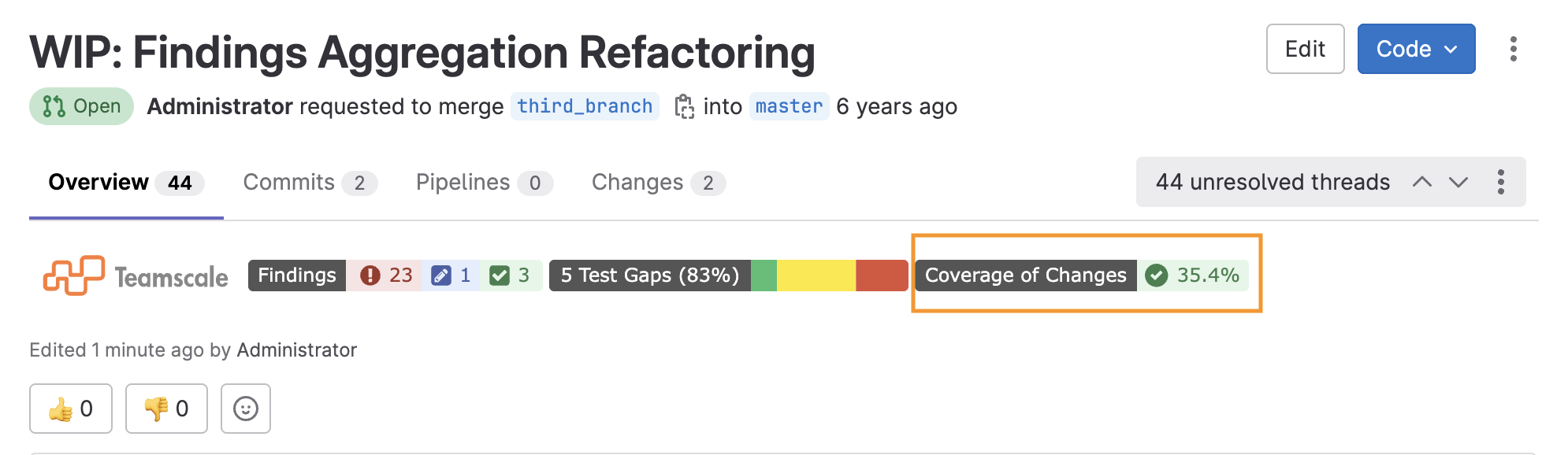
Coverage of Changes Badge for GitLab Merge Requests
GitLab merge requests can now display a "Coverage of Changes" badge showing the percentage of added or modified code covered by tests, color-coded green or red, based on your configured line coverage threshold. This can be enabled via the Badge for Coverage of Changes connector option.
Recent Merge Requests on the Start Page
The Teamscale Start page now includes a Recent Merge Requests section, listing active merge requests where you are the author, assignee, or reviewer across your development projects.

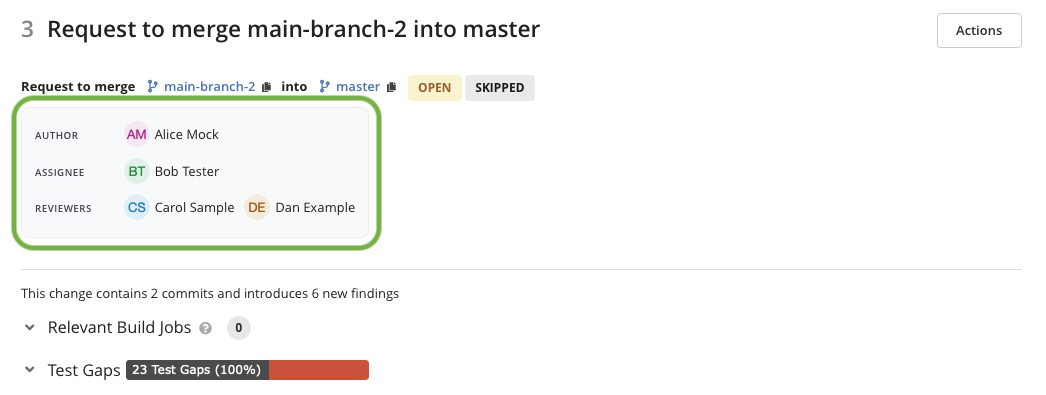
Merge Request Details: Author, Reviewers, and Assignees
The Merge Request Details view now shows authors, reviewers, and assignees directly in Teamscale, so you can see who is responsible for a merge request without navigating to the external platform. This is supported for all seven code collaboration platforms.
Tolerated and False Positive Findings in Merge Requests
Tolerated and false positive findings are now shown in merge request details and badges in the platforms.
Analysis Capabilities
C/C++ and Objective-C: Support for Target Environments
C/C++ and Objective-C analysis profiles now allow you to specify the target build environment. You can set a target triple (e.g., x86_64-pc-linux-gnu) so that Teamscale uses the correct library headers and preprocessor definitions for your platform. The profile also shows which preprocessor macros are implied by the selected triple. Furthermore, you can pass additional command-line options to Clang-Tidy and Cppcheck directly from the analysis profile.
Together, these settings reduce false positives and false negatives that previously occurred when the analysis environment did not match the actual build environment.
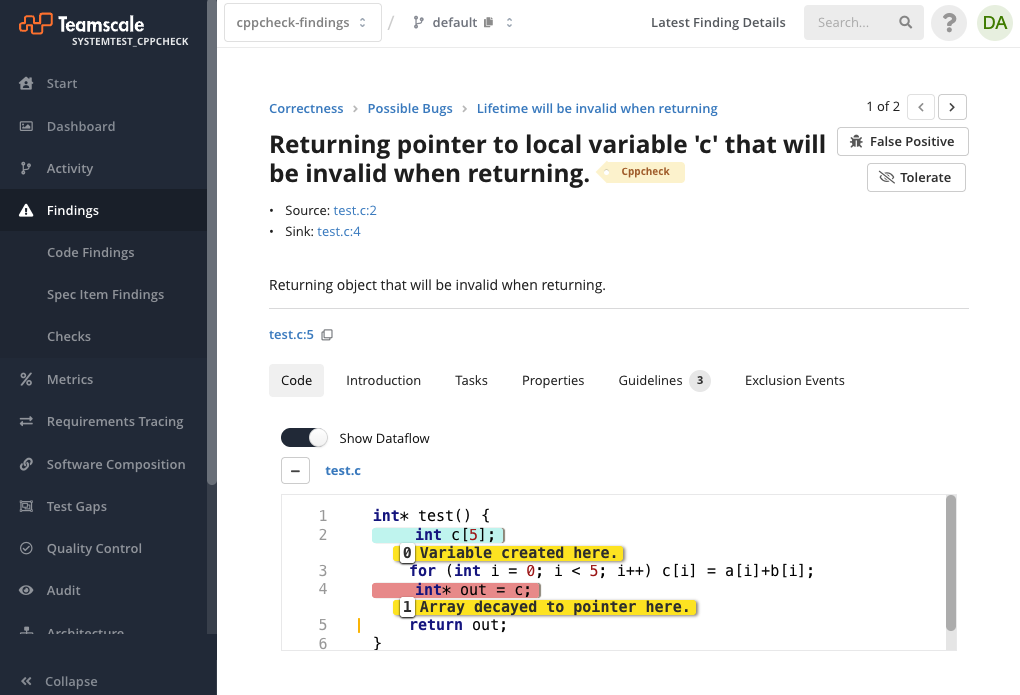
Improved Visualization of Cppcheck Data Flow Findings
Cppcheck findings that involve data flow (e.g., null-pointer dereferences or uninitialized variables) now display the dataflow path directly in the Finding Detail view, so you can trace the sequence of steps that leads to the issue.
Language Support & Checks
- The Java static analysis now recognizes the
///Markdown Javadoc syntax introduced in Java 25. All comment-related checks (e.g., comment completeness,@param/@throwsvalidation) work with the new syntax just as they do with traditional/** */Javadoc comments. - PL/SQL: The check "Use CASE Instead of Complex IFELSE Blocks" provides a new option to configure the number of allowed
ELSE/ELIFbranches. - Swift: A new check allows detecting redundant access-level modifiers on entity declarations.
- Updated the bundled Semgrep engine and GitLab SAST rule definitions to their latest versions, improving SAST scan startup performance and fixing false negatives in several Java injection rules.
Web Interface
- The search results view now shows which project the commits belong to, allowing a quicker association of result commits with the project context.
- The Check Explorer now allows filtering checks by severity (Red, Yellow, or Auto), making it easier to identify and manage checks at a specific severity level.
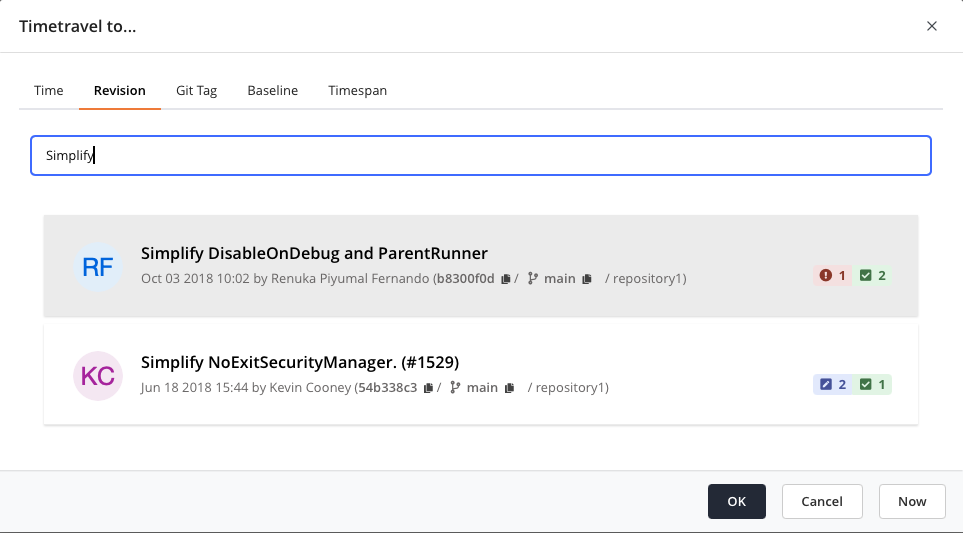
- The revision chooser (available in the time travel or baseline configuration dialogs) now includes a search field that lets you find revisions by search terms. For matching commits, it also displays details such as author and commit message, making it easier to find the right point in the project's revision history.
Software Composition Analysis
- Introduced dedicated "Tolerate" and "Mark as False Positive" options for vulnerability exclusion.
- Vulnerabilities excluded in JFrog Xray are now imported as pending when the Exclusion Workflow is enabled.
- The JFrog Xray connector now has a
Synchronize deleted ignore rulesoption. When disabled, ignore rules deleted in Teamscale are no longer automatically removed from Xray, giving you explicit control over deletion propagation. - Builds and build versions imported from JFrog Xray can now be deleted through the Teamscale UI, allowing you to clean up old or irrelevant entries.
Quality Control
- Default project threshold configurations can now be used as a starting point for creating new configurations.
- Reports: Callouts can now be copied and pasted in the report editor within and between slides.
- When the exclusion approval workflow is enabled, users now receive an email notification when their request to tolerate or mark a finding or violation as false positive is rejected.
- Administrators can now selectively disable tolerations and false positive markings for specific quality indicators (e.g., "Security"). This allows organizations to enforce that certain finding categories can only be tolerated through an explicit approval process.
Administration & Operation
- The analysis profile comparison feature has been enhanced to be more accessible by adding a color-blind mode and a help icon for colors.
- The Prometheus metric for outgoing REST calls now includes an HTTP status code label, making it easier to monitor different types of errors from external services.