
Update Notices for Teamscale 2026.1
Teamscale 2026.1 is now available
- The Docker image
cqse/teamscale:2026.1.0is now available on Docker Hub - You can also download Teamscale as a ZIP archive here
2026.1 Java 25 Required (Teamscale server application)
Starting with version 2026.1, the Teamscale server will require Java 25 to be executed.
Action required: In case you are not using a Docker-based deployment, please make sure to update the JRE used for executing Teamscale to Java 25.
2025.9 Removed Base Configuration for Threshold Configurations
The ability to define a Base Configuration for a Threshold Configuration has been removed with version 2025.9.
2025.9 Removed the movetolastcommit query parameter in all 'External Analysis' API endpoints
The movetolastcommit parameter was no longer needed and has been removed with version 2025.9 to avoid confusion for all the 'External Analysis' API endpoints:
- Create a Session:
POST /api/projects/{project}/external-analysis/session - Upload External Report(s):
POST /api/projects/{project}/external-analysis/session/{sessionId}/report - Upload External Analysis Data:
POST /api/projects/{project}/external-analysis/session/{sessionId}/external-analysis-import-infos - Upload External Findings:
POST /api/projects/{project}/external-analysis/session/{sessionId}/external-findings - Upload External Metrics:
POST /api/projects/{project}/external-analysis/session/{sessionId}/external-metrics - Upload Non-code Metrics:
POST /api/projects/{project}/external-analysis/session/{sessionId}/non-code-metrics
2025.7 Deprecated AllowAll Authenticator
For security reasons, the AllowAll Authenticator has been deprecated and will be completely removed with version 2026.2.
2025.7 Removed SPCop Upload Format
The SPCop upload format has been completely removed with version 2025.7.
2025.5 Removed Legacy API: Pre-Commit 2 REST API
The pre-commit 2 REST API, unused by Teamscale's own IDE plug-ins since version 9.3, has been completely removed with version 2025.5.
Action required: If you are using the API to make pre-commit requests, either update to the new /api/projects/{project}/pre-commit3 REST API or, preferably, use the command-line client for developers (teamscale-dev) to perform your requests.
2025.4 Removed feature: Timespan-based threshold configurations
The Timespan-based threshold configurations section of the "Threshold Configuration List" project option has been removed, as this functionality caused inconsistencies when combined with certain other features and was rarely used. This change does not affect the project's default threshold configuration.
Re-Analysis when Upgrading
- When updating from 2026.1.x, drop-in.
- When updating from 2025.9.x or earlier, a full re-analysis via backup is required.
What's New for Teamscale 2026.1
GitHub Integration
GitHub: Check Runs for Critical Change Badges
Critical Change badges are now posted as dedicated GitHub check runs directly on the pull request overview page, making it significantly easier for developers to identify when their changes affect critical code paths and/or code.
Improvements include:
- Prominent visibility: Each Critical Change badge appears as a separate check run on the PR overview, enhancing visibility and accessibility.
- Relevant Visibility: Check runs are posted only when pull request changes match the paths configured in the badge, reducing noise by avoiding unnecessary checks.
- Direct access to details: Developers can immediately see in the check run details which critical paths were affected with direct links to each critical location in Teamscale for further investigation.
- Non-blocking checks: Critical change check runs use a neutral conclusion, ensuring they inform developers without blocking pull request merges.
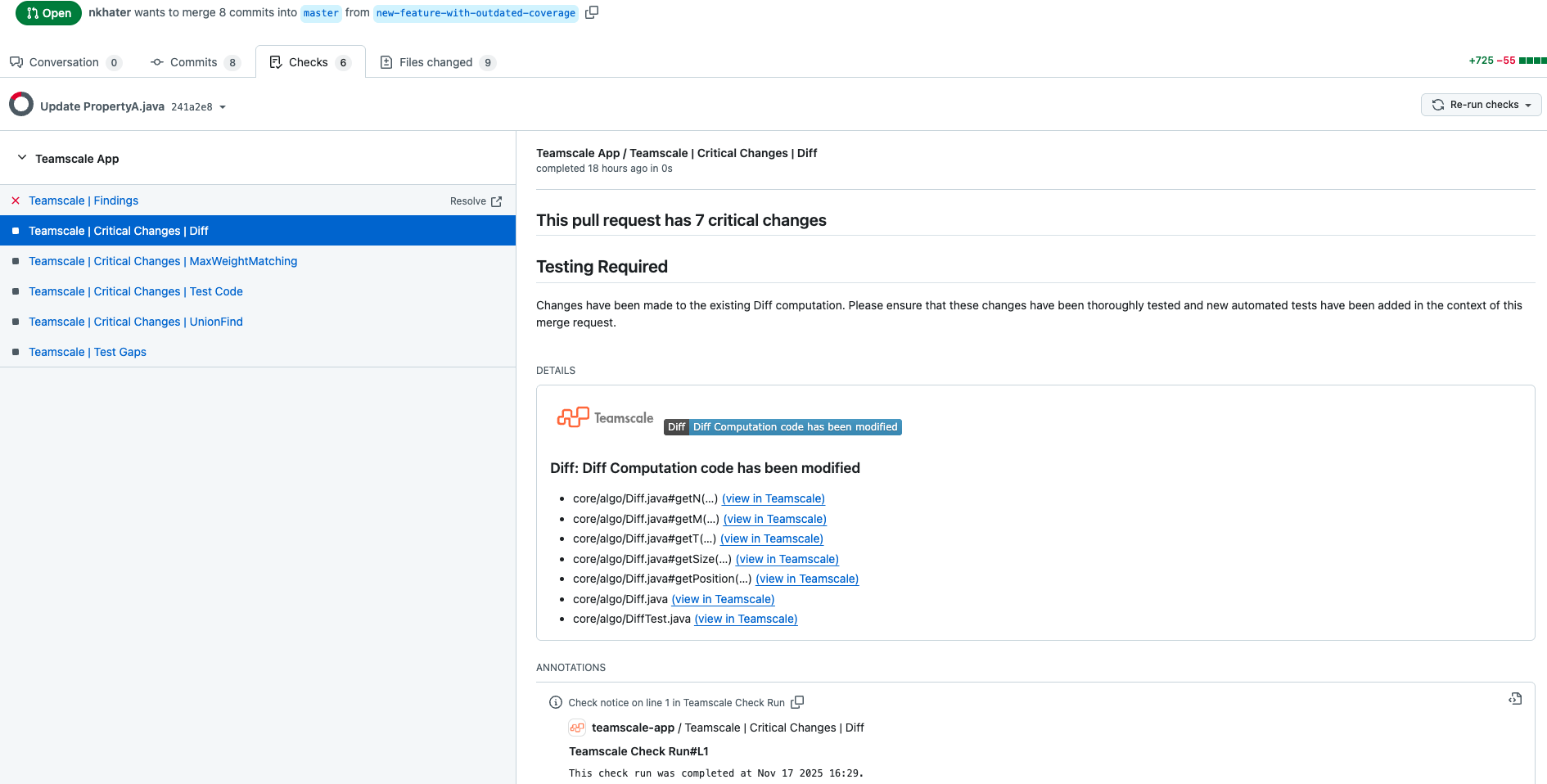
This enhancement brings critical change information to the forefront of the PR review workflow.
GitHub SSO: Team Membership Synchronization
Teamscale now synchronizes GitHub team memberships during GitHub SSO login, enabling organization-level access control.
Key capabilities:
- Automatic team import: Teamscale can automatically retrieve and create group teams from users' GitHub organizations upon login.
- Organization-level isolation: Users have access to projects only from GitHub organizations they belong to, preventing cross-organization access.
- Flexible access control: Administrators can map GitHub teams to Teamscale groups and use these groups to configure project access permissions.
- Multi-organization support: A single GitHub App can be installed across multiple organizations, with team memberships synchronized for all of them.
This feature leverages GitHub's existing team structure for efficient access management in Teamscale, eliminating the need for manual user permission adjustments.
Quality Control: Reports
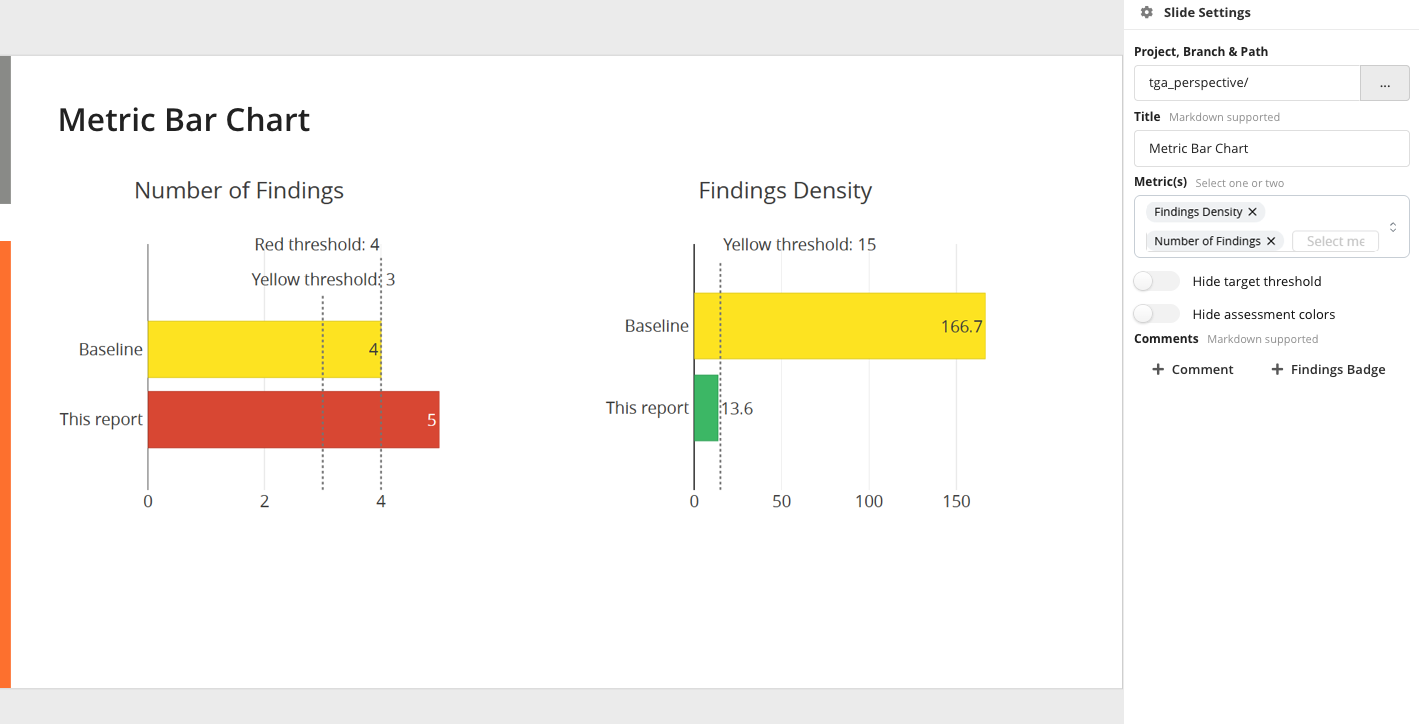
The Metric Bar Chart Slide now supports displaying the bar colors based on threshold assessment, providing immediate visual feedback on whether metrics meet their targets. This enhancement makes it easier to quickly identify which metrics require attention in reports.
Web Interface
- Project Edit View: Added navigation warning to prevent accidental loss of progress when navigating away or refreshing during project creation or editing.
- Keyboard Accessibility: Dropdown menus are now keyboard accessible, improving usability.
Guidelines Visualisation
Guideline Explorer
The Guideline Explorer has been enhanced to display a comprehensive list of all rules associated with each guideline, providing better visibility into guideline composition and its rules.
Guideline Summary Widget
The Guideline Summary Widget now includes an option to Only show rules with at least one available check, allowing users to view a condensed list of rules that have checks available in the analysis profile. This new filtered view also helps users quickly assess check enablement status for the different guidelines.
Static Analysis
Clang Static Analyzer: xcresult Format Support
Teamscale now supports the upload and processing of Clang Static Analyzer results in the xcresult (json) format generated by xcodebuild, allowing the mapping of findings from Xcode builds directly into Teamscale.
Integrated Tools
SwiftLint has been updated to version 0.61.0, incorporating the latest checks and improvements.
Approval Workflow for Excluded Findings
Teamscale now automatically sends email notifications to users when their request to mark a finding as a false positive or a tolerated issue is rejected, enhancing communication within the finding approval workflow.
ABAP Checks
- New option for "Control flow depending on system variables" and "Usage of system variables" checks to consider static methods of the
CL_ABAP_SYSTclass.
Plugins & Integrations
IntelliJ Plugin
IntelliJ users can now toggle a Show Only Pre-Commit Findings option in the editor gutter to focus exclusively on findings they would introduce with their changes, filtering out existing findings from the base branch.
Command-line client (teamscale-dev)
The teamscale-dev command-line client for developers now supports filtering findings by category (e.g., correctness, structure, security) or severity (e.g., red/error findings), enabling developers to focus their efforts on specific types of issues.
Administration & Operation
S3 Storage: Time Range Scanning
Teamscale now supports time-range scanning for S3-based external storage by prefixing upload dates to storage paths, allowing efficient retrieval of recent date buckets through S3 prefix queries. This approach addresses S3's limited incremental scanning capabilities and ensures data consistency with a daily full scan to detect deletions, complementing the existing webhook-based incremental scanning.
Repository Configuration Options
The repository configuration options in code connectors have been renamed for improved clarity as follows:
Repository identifier→Connector IdentifierRepository name→Repository Path
These improved labels aim at reducing confusion, making it clearer what each field represents.